3CX cloud + SBC + Grandstream + 3CX android APP

Icefingers

Trial User
Joined
Sep 7, 2025
Messages
6
Reaction score
5
Hello,


Sorry for posting this in the wrong section — I don’t yet have the privileges to post in the proper category.


I am facing an issue with video on the 3CX Android App.


Setup:


  • 3CX Cloud with an SBC in my office
  • Grandstream devices: GXV3275 video phone, GDS3710 doorbell/intercom
  • Clients: 3CX Web App and 3CX Android App

Configuration:


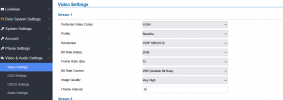
  • All Grandstream devices are set to use H.264 for video
  • The GXV3275 works perfectly with both audio and video on the Web App, the 3CX Android App, and the GDS3710
  • The GDS3710 works fine with the GXV3275 and with the Web App (Chrome), but when calling with the 3CX Android App, I only get audio (no video)

Observations:


  • The SBC does pass video streams correctly, since the GDS video works perfectly in the Web App (Chrome)
  • GDS3710 firmware version: 1.0.13.15
  • The GDS3710 is officially supported by 3CX, but when provisioning it, 3CX suggests downgrading to firmware 1.0.7.19, which is very old

Questions:


  • Any idea why video is not working specifically on the 3CX Android App?
  • Could this be related to the codec, SIP signaling, or limited compatibility of the Android App with the H.264 streams from the GDS?
  • Is there a plan to update the 3CX templates for the GDS3710 so that it doesn’t force a downgrade to such an outdated firmware?

Thanks in advance, and apologies again for posting this in the wrong place.
 
Main vs Base Profile for video.

The mobile app needs a lower quality feed.

Also, GXV3275??? Those are ANCIENTS! You should grab a 3380 or something like that instead. Or use supported phones.
 
Hello, thanks for your reply. Just to clarify:


  • As I wrote, the GXV3275 works perfectly with the same stream settings as the GDS3710. Both audio and video work fine on the 3CX Android App, as well as on the Web App.
  • The issue only happens with the GDS3710 on the Android App: audio is fine, but no video.
  • Both devices are configured to use H.264 with Base Profile, so we are not using Main Profile on the GDS3710.
  • This confirms it’s not a general limitation of the mobile app, since the GXV3275 video stream is displayed correctly there.

So the question remains why the GDS3710 stream is not handled properly on the 3CX Android App, despite having identical settings.
 
Hello everyone,


I would like to share the progress I made with the integration of my Grandstream GDS3710 with 3CX.


  • I first provisioned the GDS as a generic SIP phone (not with the built-in template).
  • Audio calls work fine between the GDS and the 3CX Android app.
  • Video also works correctly when calling the GXV3275 and in the 3CX WebClient.
  • However, video is still not displayed in the Android app when the call comes from the GDS.

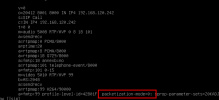
After checking the SIP INVITE and SDP offers through the SBC logs, I noticed some differences:


  • The GDS sends H.264 with packetization-mode=0 (Single NAL Unit).
  • The GXV3275 sends H.264 with packetization-mode=1 (Non-Interleaved), which is accepted by the Android app.
  • Resolution and profile are now aligned (Baseline, Level 3.1, 720p).

So the only remaining difference seems to be the packetization mode. Unfortunately, I could not find any setting in the GDS UI to change this.


Does anyone know if the GDS3710 can be forced to use packetization-mode=1 (maybe through P-values or configuration file)? Or if 3CX has any workaround to handle video streams with packetization-mode=0 for Android clients?


Thanks in advance for any insights,
Jérômegds-tcpdump-sbc.png
 
See if this helps at all:

1757414115350.png

1757414125381.png
 
  • Like
Reactions: Evolute IT
Thanks for the reply, but i'm not sur lowering resolution/bitrate is not the real problem.
My GXV3275 works fine at 720p / 2048 kbps with the 3CX Android app.

but I will try anyway this evening.


The real issue is in the SDP offer:


  • GDS3710 → packetization-mode=0 (single NAL unit)
  • GXV3275 → packetization-mode=1 (non-interleaved, standard)

This is the only difference, and, in my mind, it’s why the Android app does not display video from the GDS.
The solution is not to reduce quality, but to make the GDS3710 support packetization-mode=1, like the GXV.

Here is a brief technical explanation :
When transporting H.264 video over RTP (SIP), the video stream is split into NAL units (Network Abstraction Layer units).
The packetization-mode parameter in the SDP (a=fmtp) defines how these NAL units are carried inside RTP packets.


  • packetization-mode=0 → Single NAL Unit Mode
    • Each RTP packet carries exactly one complete NAL unit.
    • Very simple, but cannot fragment large frames.
    • Works only for low resolutions/bitrates.
    • Considered legacy and rarely used in modern SIP/WebRTC clients.
  • packetization-mode=1 → Non-Interleaved Mode
    • Allows multiple NAL units per RTP packet.
    • Supports fragmentation of large NAL units across several RTP packets.
    • This is the standard and widely supported mode in SIP, WebRTC, and 3CX.
    • Provides much better compatibility with modern clients (including mobile apps).


      I really appreciate the time you are spending on my problem. Thank you !
 
Update:


Thanks everyone for your suggestions. I wanted to share some good news and close the loop on this issue.


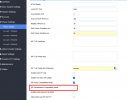
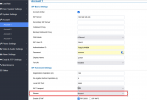
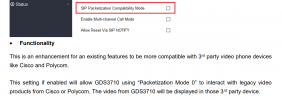
After working with Grandstream support, I discovered that the problem was related to the “SIP Packetization Compatibility Mode” setting on the GDS3710.
By simply disabling this option in the WebGUI (Phone Settings → SIP Packetization Compatibility Mode), the GDS3710 started sending H.264 with packetization-mode=1 (Non-Interleaved) instead of mode=0.


As soon as this change was applied:


  • Video now works perfectly in the 3CX Android app,
  • It also works in the WebClient,
  • And it is stable even with Stream 1 set to 1080p @ 2048 kbps.

So the setup is now fully functional

Thanks to all to read me and help me
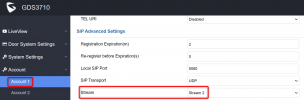
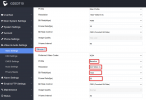
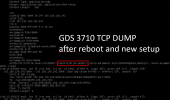
Thanks again to Grandstream support for pointing me in the right direction, and hopefully this helps anyone else running into the same issue.Capture d'écran 2025-09-09 215913.pngCapture d'écran 2025-09-09 220506.pngCapture d'écran 2025-09-09 220630.pngCapture d'écran 2025-09-09 220641.png
 
After working with Grandstream support, I discovered that the problem was related to the “SIP Packetization Compatibility Mode” setting on the GDS3710.
By simply disabling this option in the WebGUI (Phone Settings → SIP Packetization Compatibility Mode), the GDS3710 started sending H.264 with packetization-mode=1 (Non-Interleaved) instead of mode=0.
This is already disabled by default in the 3CX template Jérôme.
1757489828056.png


And if you provision a factory reset GDS3710, the first call you make goes out like this packetization=1

1757489774868.png

And according to Grandstream:
1757490036617.png

So not sure why yours was set otherwise in the first place to be honest. You can reset the device and provision it using our default template to compare, without changing anything else at all in the device and see if it works.
 
Thank you very much, John.
I'm not sure how I ended up selecting this feature... But, to add to what you just said and just to clarify for those who are interested :

SIP Packetization vs. H.264 Packetization​


There are actually two different concepts that both use the word packetization, which can easily lead to confusion:


  1. SIP Packetization Compatibility Mode (Grandstream UI / P957)
    • This is a legacy compatibility toggle at the SIP/RTP level.
    • It mainly affects how RTP audio frames (e.g. G.711, G.729) are packetized (20 ms, 30 ms, etc.).
    • It was designed for older PBXs that had strict requirements on RTP formatting.
    • Normally, it should not directly impact H.264 video negotiation.
  2. H.264 Packetization Mode (SDP attribute a=fmtp:... packetization-mode=X)
    • This is defined in RFC 6184 for transporting H.264 video over RTP.
    • It specifies how NAL units (video frames) are sent inside RTP packets:
      • 0 = Single NAL Unit mode (legacy, limited).
      • 1 = Non-Interleaved mode (modern standard, supports fragmentation, used in WebRTC/3CX/Android).
      • 2 = Interleaved mode (rarely implemented).


The Quiproquo​


When troubleshooting the GDS3710, the assumption was that “SIP Packetization Compatibility Mode” was unrelated to H.264 video.
However, in practice, on the GDS3710 this setting also changes the SDP video announcement:


  • With Compatibility Mode enabled → the SDP advertises packetization-mode=0.
  • With Compatibility Mode disabled → the SDP correctly advertises packetization-mode=1.

This was the missing piece: the Android 3CX app requires packetization-mode=1, while browsers are more tolerant and accept mode=0.

In many Granstream devices, H264 packetization mode is clearly specified. .


Conclusion:
The terminology caused confusion, but disabling SIP Packetization Compatibility Mode on the GDS3710 indirectly fixed the H.264 packetization-mode, making it compatible with the 3CX Android app — even at 1080p / 2048 kbps.

For my part, I am learning more every day about the SIP protocol and networking in general.
And I think it's really cool.

Thanks again for taking the time to read my post.

Take care.
 

Members Online Now

No members online now.

Forum statistics

Threads
111,831
Messages
589,277
Members
164,660
Latest member
RJenkinsROCK