


- Joined
- Aug 30, 2022
- Messages
- 1
- Reaction score
- 0
Hello 3CX Technical Team
Please we need your advice regarding to our 3cx cloud deployment.
We are an international company having branch offices in 4 countries (Egypt, UAE, Oman, and KSA)
We are planning to implement a 3cx system on AWS instance and interconnect it to our branch offices.
And we have connection to landlines on each office based on:
Please we need your advice regarding to our 3cx cloud deployment.
We are an international company having branch offices in 4 countries (Egypt, UAE, Oman, and KSA)
We are planning to implement a 3cx system on AWS instance and interconnect it to our branch offices.
And we have connection to landlines on each office based on:
- PRI Modem, Voice Gateway “Yeastar TE100” and leased line connection 20MB with public IP on Egypt.
- SIP Trunk with private IP not public IP on KSA and UAE, and Business internet connection.
- SIP Trunk with sip trunk modem on Oman, and business internet connection.
- Using a firewall on each branch and firewall instance on cloud through VPN Tunnel to connect PRI over voice gateway for Egypt office, and SIP Trunk for each branch office (UAE, Oman, KSA).
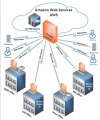
- Using voice gateway on each branch and connected them to cloud.
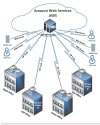
- Through firewall with VPN Tunnel (more secure, but with bigger cost and complex steps)
- Or with voice gateway
- I’m going to use Yeastar TE 100 Voice gateway on Egypt with (PRI modem supported to Sip Trunk) and a sip modem to other branches (but I want to make sure if we can connect to cloud through Voice gateway without VPN tunneling.
- Can we linkup Yeastar voice gateway on branches (Egypt, UAE, Oman, KSA) to the cloud instance.
- If we can install voice gateway and connect sip trunk to it for (UAE, Oman, KSA), and connect PRI Modem to voice gateway for Egypt office then connecting them directly to the 3cx instance hosted on the cloud it will be a good idea, but is it applicable?
- Appreciate you help and support for this urgent case.


