- Joined
- Feb 9, 2016
- Messages
- 16
- Reaction score
- 2
Hello,
I am experiencing an issue with the Global Company Phonebook in 3CX V20.
I have added company phonebook entries in the Global Company Phonebook. The Department field was intentionally left empty. All phone numbers were entered without any whitespaces. For example, the number 0485 58 58 55 was stored as 0485585855 in the Mobile field and linked to a contact name.
However, when an incoming call from the number 0485585855 arrives, the number is not translated to the corresponding contact name. I see the number 0485585855 .
I also don't see the contact name in the cdr reports.
I have verified that:
Could you please advise on what might be causing this behavior or if additional configuration is required in 3CX V20 for number-to-name resolution?
Best regards,
Tom Van de Putte
I am experiencing an issue with the Global Company Phonebook in 3CX V20.
I have added company phonebook entries in the Global Company Phonebook. The Department field was intentionally left empty. All phone numbers were entered without any whitespaces. For example, the number 0485 58 58 55 was stored as 0485585855 in the Mobile field and linked to a contact name.
However, when an incoming call from the number 0485585855 arrives, the number is not translated to the corresponding contact name. I see the number 0485585855 .
I also don't see the contact name in the cdr reports.
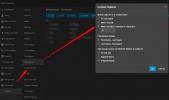
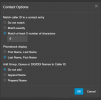
I have verified that:
- The contact exists in the Global Company Phonebook
- The number format contains no spaces or special characters
- The entry is saved correctly
- Contact options are specified
- Phonebook display: First Name, Last Name
- Match at least X numbers of characters: 6
- Add Group, QUEUE, DID/DDI to Caller Id: Do Not Add
- Restarted the PBX multiple times already to be sure
Could you please advise on what might be causing this behavior or if additional configuration is required in 3CX V20 for number-to-name resolution?
Best regards,
Tom Van de Putte