3CX contacts and CRM synchronization

Status
Not open for further replies.

ggiz

Customer
Joined
Jul 24, 2019
Messages
15
Reaction score
6
Dear 3CX team,

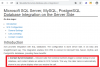
please change your documentation. It is wrong!
1588848698293.png

It should be correct:
  • Contact synchronization - Incoming calls from external numbers trigger a contact lookup in your database. If the number does not exist in the 3CX contacts, a new 3CX contact is created. In this way, the name of the caller is automatically displayed on your phone when you receive a call from this number again later.
  • Additional: Existing 3CX contacts will not be updated thru CRM!

Sad but true :confused:!
 
If you use the 3CX Web Client, you will see the caller name even for the first call.
 
Thanks for the tip! I passed it on to our employees. However, it would be great if the contacts were displayed correctly on the desk phone the first time they called. And also updated when they call again.
 
In the following systems, the data (firstname lastname) is also displayed in the ongoing call immediately after creating a CRM contact:
  • Webclient,
  • Switchboard
However, only the bare number is displayed here:
  • VOIP desk phone,
  • 3CX app,
  • Webclient Call History and
  • KDS
 
This is because the contact's information is not available when the call starts. The INVITE is already sent, the SIP session established, and the information can't be changed later.

The Web Client uses a different protocol to get this information, and that's why it can get the information later.
 
Ok, thanks! But, can't that be done afterwards by an info message?
http://wiki.snom.com/FAQ/How_to_change_the_displayed_source_and_destination_data_of_a_call

Code:
INFO sip:[email protected] SIP/2.0
Via: SIP/2.0/UDP 192.168.10.59:1036;branch=z9hG4bK29c9b031;rport
From: "+49151555666777" <sip:[email protected]>;tag=as2551b6cf
To: <sip:[email protected]:5060>;tag=ctxr9rd1t6
Contact: <sip:info@PBXserver>
Call-ID: [email protected]
CSeq: 200 INFO
Max-Forwards: 70
User-Agent: snom320/testing_branch_7_3_2009_02_23_13_32_41
Content-Type: message/sipfrag
Content-Length: 45

To:
From: "first contact from CRM" <sip:[email protected]>
 
3CX will not do this. The only way to get the caller name for the first call is using the Web Client...
 
Status
Not open for further replies.

Forum statistics

Threads
112,326
Messages
591,900
Members
165,479
Latest member
Senergia