3CX CPU load increasing

Status
Not open for further replies.

Horatio

Bronze Partner
Basic Certified
Joined
Apr 12, 2018
Messages
5
Reaction score
0
Hi,

We have a issue that has been happening with a number of our AWS hosted PBXs in the last 2 months.

Some of our PBXs are experiencing high CPU load which is causing the PBX to crash, after rebooting the AWS server it resolves the issue.

We have SSH load sensors monitoring and found that within the space of 5 mins the load goes from 5% to 100% and stays there, calls cannot be made or taken.

This happens at all hours of the day, we have updated all of them to 15.5.15502.6 recently and that has been the only change.

Any help would be appreciated.

thanks
 
Which process is causing your high load? If you have a monitoring, it should show the process.
 
The monitoring is not that detailed unfortunately, just a load sensor only on SSH load.
 
What type of EC2 instance are you using, is Windows or Debian. Depending on the size of your deployment you need to provide resources. Also if its t2 or t3 instance please enable t2 unlimited for the instance. T2 instance only provide 20% of CPU capacity above that you incur CPU credit to burst, if you are using a very small instance size it is possible you may have ran out of CPU credit and AWS limit you to 20 % of the allocated CPU capacity in that case you will have service crash etc.

If its windows server you can check the which process is using CPU by RDP to it. For Debian you can SSH the server and check CPU utilization by process, use PS or top command here is the reference for you.

https://linoxide.com/monitoring-2/10-tools-monitor-cpu-performance-usage-linux-command-line/

Another thing you want to check is if you getting Denial of service attack.

I am running V16 with one CPU and 1 GB of ram on Windows server 2016 for 20 people. It work fine, but for larger deployment and specially if you have multiple IVR and Queue you need to make sure you allow 2 to 4 GB of ram and 2 VCPU. Feel free to use t2 instance to keep the cost low but enable t2 unlimited.

Finally remember if you shutdown the server even for one second and turn it on back you have zero CPU credit so you need to run it at 20% CPU capacity for little while to accumulate some CPU credit.

Hope this help, feel free to contact me if you need further assistance with AWS stuff in addition to 3CX.
 
Last edited:
Thanks for the great information Iversion.

We are running t2.micros with 4GB RAM and Debian but unlimited is disabled, could start to get expensive is we open that up for all instances without know the root cause...

We tried to use top commands to monitor which actual process is causing the issue but by the time it spools up then you can even SSH into the server, it usually happens within 5 minutes of our external monitoring sending the alert, so at that point we have to reboot and then the CPU usage drops back to 3-5%.

Also we don't believe its a DOS attack as each instance has a firewall for SSH ports specifically.

One other thing to note is that after the reboot the same instance does not spool up CPU usage to date.

We will keep monitoring and update you all.
 
t.micros don't come with 4GB RAM.

https://aws.amazon.com/ec2/instance-types/

I have shared link for AWS instance sizes and how many CPU credit you will accumulate per hour. You should not have to rely on t2 unlimited all the time. Its only there to avoid server crash, if you CPU usage is high all the time its time to either figure out what is causing it or if its legit threads then change your instance type to larger.

https://docs.aws.amazon.com/AWSEC2/latest/UserGuide/burstable-credits-baseline-concepts.html

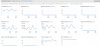
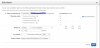
You can take advantage of AWS Alarm to notify you if CPU usage is high see attached image of sample alarm that notify me if the CPU usage is over 20% (you need cpu credit or t2.unlimited to be able to go over 20%). This way you can see if its temporary or consistent. You will have short burst time to time and your CPU credit should cover that period without extra cost.

Please note each instance size have different base line and burst performance, for example if you are using T2.micro your baseline performance is 10% CPU so if you burst over 10% you need CPU credit or else your system will have issues.

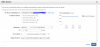
You can also setup an alarm to receive notification if your CPU credit balance is low. Please note if you shutdown t2 instance your credit get wasted. The max credit you can accumulate is 144 for t2.micro.

If your CPU is over 10% it will start using 1 cpu credit from the bank per minute, with the total of 144 credits you could easily burst to 100% for 2 hours. You may want to set alarm to notify you if CPU usage is over 10% for period of an hour or 30 minutes. Also an alarm to notify you if CPU credit is balance is less than 50 credits.

I hope this information is useful for you. Do not hesitate to like it if you find this information helpful.
 

Attachments

  • cloud watch.PNG
    cloud watch.PNG
    71.3 KB · Views: 9
  • CPU credit alarm.PNG
    CPU credit alarm.PNG
    37.5 KB · Views: 9
  • CPU usage alarm.PNG
    CPU usage alarm.PNG
    35.7 KB · Views: 8
Status
Not open for further replies.

Forum statistics

Threads
111,923
Messages
589,752
Members
164,796
Latest member
Dame24