3cx creates tickets in Zendesk after working hours

marekpierog

Premier Customer
Joined
Nov 7, 2019
Messages
1
Reaction score
0
Hi,

After updating 3cx to V20 I have a problem with tickets that are created in Zendesk after the call ends.

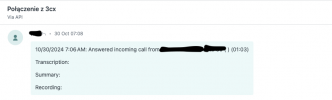
During office hours everything works fine, but after office hours (which are set in 3cx and Zendesk) tickets are also received as "call from 3cx" even though the office is closed and the message after office hours is set. I would like 3cx not to create tickets in Zendesk after office hours, is it possible?

Please help me with this, because these tickets take up space in the Zendesk mailbox unnecessarily:
1730893321210.png
 
Last edited:
Was this working differently before the upgrade? I don't think there was any change related to this....

The Zendesk template will log all the calls coming from a matching contact, so you will probably need to adjust the template to do this. If the call received out of office hours is not sent to an agent, then an easy fix could be changing this:
<Outputs AllowEmpty="true" Next="CreateTicket" />

to:
<Outputs AllowEmpty="false" Next="CreateTicket" />

This will cause that the CreateTicket scenario is not executed when there is no agent involved. The standard integration will create the ticket anyway, but not assigning it to an agent.
 
  • Like
Reactions: Evolute IT
I had a similar issue where we didn't want tickets created if the caller hung up inside of the IVR before reaching an agent. With the ZendeskV2 the modification that seems to have worked is changing

XML:
<Outputs Next="CreateCallActivity" AllowEmpty="true" />
to
<Outputs Next="CreateCallActivity" AllowEmpty="false" />
 
I had a similar issue where we didn't want tickets created if the caller hung up inside of the IVR before reaching an agent. With the ZendeskV2 the modification that seems to have worked is changing

XML:
<Outputs Next="CreateCallActivity" AllowEmpty="true" />
to
<Outputs Next="CreateCallActivity" AllowEmpty="false" />
Yes, that prevents further scenarios from being executed when the previous one doesn't generate an output.
 
  • Like
Reactions: Evolute IT
Hello! , i have broken the Zendesk V2 template by mistake and i do not have the copy of XML. How can i find the default XML and make the integration again with my Zendesk. I tried CRM template generator but there is no defaults settings for zendesk v2there too. I would be glad if somebody send me the default XML backup file since there is private data in it , it is just a template. Thank you very much in advance.
 
Hello! , i have broken the Zendesk V2 template by mistake and i do not have the copy of XML. How can i find the default XML and make the integration again with my Zendesk. I tried CRM template generator but there is no defaults settings for zendesk v2there too. I would be glad if somebody send me the default XML backup file since there is private data in it , it is just a template. Thank you very much in advance.
Just delete it from the 3CX Console > Admin > Integrations > Select the template > Delete button. Then go to System > Updates, and get it back.
 
Thank you very much . it worked. now i am trying to stop customers receiving the automatic created call tickets. because ticket is created as public ticket and customer email is requester in the ticket and receives every detail with the call. Is there a way to stop customer receiving email copies? i could not manage to create tickets as internal notes, i had broke down default XML while trying to convert it to an internal ticket :)
 
Thank you very much . it worked. now i am trying to stop customers receiving the automatic created call tickets. because ticket is created as public ticket and customer email is requester in the ticket and receives every detail with the call. Is there a way to stop customer receiving email copies? i could not manage to create tickets as internal notes, i had broke down default XML while trying to convert it to an internal ticket :)
I'm not sure if that's possible, probably a question to ask to Zendesk, maybe those notifications can be disabled....
 
modifying template xml works for creating ticket as internal.
Creating a trigger in Zendesk to prevent email sending could be a solution too. you are right.

<Value Key="CommentBody" Type="String">[DateTime]: Answered incoming call from [Number] [Name] to [Agent] ([Duration])[LineBreak][LineBreak]Transcription: [Transcription][LineBreak][LineBreak]Summary: [Summary][LineBreak][LineBreak]Recording: [RecordingUrl]</Value>
<Object Key="comment">
<Value Key="body" Type="String">[CommentBody]</Value>
<Value Key="public" Type="Boolean">false</Value>
</Object>
 
To create the ticket as internal can the above XML be inserted anywhere into the template or does it require being entered into a specific scenario or location?
 
To create the ticket as internal can the above XML be inserted anywhere into the template or does it require being entered into a specific scenario or location?
You have to edit the CommentBody scenario.
Also keep in mind if you want the change to survive 3CX upgrades, you want to edit the ID of the template so that it's not overwritten.
 
There is no Commentbody section found in our Zendesk V2 template when i click "show template" and try to search through it
 
My XML has different modifications so it may not work for you, but the XML from @artooro seems nice and you can use it directly.
 

Members Online Now

Forum statistics

Threads
111,832
Messages
589,284
Members
164,662
Latest member
DejanMDS