3CX Debian directly connected to Public IP address

Beheer Winadmins

SOHO User
Joined
Mar 31, 2025
Messages
7
Reaction score
0
Hello,

I'm very new to 3CX and I was wandering if the 3CX IPPBX can be connected directly to a public IP address. We have an DrayTek Router with a Routed Subnet configured to connect one of the Public IP addresses directly to a designated LAN port and this works. We have enabled DHCP on this LAN port so that any device which is connected to this port gets the Public IP address we want. We configured the 3CX installation to receive an IP address from DHCP and the Public WAN IP is configured on the 3CX IPPBX, but sadly nothing works.

Is this scenario possible? and if, what do we have to to do get the 3CX IPPBX fully connected and working on the designated Public IP address?

Best regards,
John
 
Normally this isn't done, on a locally hosed system due to security concerns and the fact that if you are hosting yourself, then it probably means you have local phones on your LAN.
That said, I'm not certain why it would not work, as a remotely hosted systems essentially operate that way. Since there is no router or firewall, all ports should be transparent to the PBX.
Have you looked over the Activity Log , for errors?
 
Hello Leejor,

I could not even login to the system when the LAN IP of the 3CX was the Public IP address. nothing worked anymore. Afterwards I put the 3CX after the firewall again and everything was working fine again. Not even one error in the activity log which could be tied to this action..
 
Haven't tried it, so i can't speak from experience, but perhaps someone else has.

What is the reason behind wanting the PBX to have a public IP?
 
The reason is that the firewall of the 3CX IPPBX has Full Cone NAT errors and IP SIP Server errors. And reading some articles the reason behind these errors should be the NAT rules from the Router. Publish the 3CX directly to the Internet should resolve these errors..
 
If even a simple router, with the proper port forwarding, in front of the PBX, will resolve the issue. I'd go with that given a lack of a firewall seems to be of no concern..
 
Last edited:
All the servers we host have public IPv4 and some IPv6. They are behind a firewall and other security of course.

If it was moved to the public IP did you update your split DNS? A Pro license has a 6 hour TTL.
 
Hello,

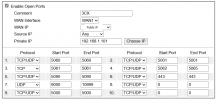
We use a Fiber Router from Draytek with a routed subnet and we configured one dedicated public IP through the 'Open Ports' config to the internal IP address of the 3CX server. And even then the 3CX firewall check gives errors. That's why we want the public IP directly connect to the 3CX server without NAT, firewalls and/or open ports. We don't know if this is the right way to do but we don't see another way to get rid of the firewall errors. Can a 3CX server connected directly to an public IP address anyway and lean only on the 3cx built-in firewall?

We know that we had to configure the split-DNS scene but connecting from an outside source should give us access when the public IP was directly delivered to the 3CX and this was not the case.

Any thoughts how to get rid of the 'full cone nat' errors?
 

Attachments

  • 3CX Firewall errors.png
    3CX Firewall errors.png
    8.6 KB · Views: 10
  • DrayTek Open Ports config.png
    DrayTek Open Ports config.png
    31.5 KB · Views: 11
Hello SteveITS,

So the recommendation is to put the 3CX Server behind a proper firewall. I followed the 3CX firewall configuration for DrayTek routers but the 3CX firewall checks still fail. Everything works fine but the checks are somehow annoying to see..

Thank you for the given answers.
 
I don't want my answer to sound mean or derogatory, but wouldn't it be better for you to find a 3CX partner in your area who knows more about 3CX, networks and routing in general than you do and who can implement a sensible concept for you or even the concept you want?
 
Hello fxbastler,

No not at all, no offense.. but with our knowledge about networks and routing in general is nothing wrong. We just don't (yet) understand at this moment how 3CX works fine with the settings we applied. In my opinion 3CX is a community driven IPPBX system where users help each other with the setup and development of the software. Therefore your answer is a bit of topic..
 
I don't think so. It's a matter of experience. But that's okay.

3CX is a purely commercial product. It's just very easy to use the well-stocked forum for your questions. However, some initiative is always advisable.

If you have sufficient networking knowledge and want to operate an on-premises 3CX, please attend the regularly held free 3CX training courses, especially the Advanced course.
https://www.3cx.com/blog/event-trainings/

Even read system and advanced here:
https://www.3cx.com/docs/manual/

As already mentioned: If you're running 3CX on-premises, it makes a lot of sense to run it in an RFC 1918-compliant network and, if possible, to open the ports required for the internet via the 3CX router. The necessary ports are listed in the guide I linked. You should already be familiar with forwarding.
 
Last edited:
About your screenshot with NAT:
There is no need to forward port 5000 and 5062 to 5065.
The forwarding of exclusively TCP only port 5001 or 443 depends on what you have chose for an HTTPS port when you set up your 3CX.
 
What exactly Draytek router is used?

The fact that you have to switch off SIP ALG in some models has already been described above. But there are also routers that operate with PAT and you have to switch it off.

These are not any peculiarities of a 3CX. This is the normal procedure at almost every VoIP TK system.
https://www.3cx.com/docs/manual/firewall-router-configuration/
 
Hello fxblaster,

Those ports 5000, 5001 and 5062 to 5065 we're 'leftovers' from an old configuration, I removed them. The firewall errors 'Full Cone NAT' and 'SIP Server'' haven't changed, they're still there. The DrayTek Router is a Vigor2952P and is slightly different then the V2820 which is described in the 3CX manual. We followed this guide and the guide for the port configuration but with no luck so far.
 

Latest Posts

Forum statistics

Threads
111,964
Messages
590,001
Members
164,869
Latest member
hpgitsupport