Solved 3CX Desktop App for Mac

Status
Not open for further replies.

rascak

Forum User
Joined
Mar 17, 2022
Messages
6
Reaction score
2
Where can I download the 3CX Desktop App Version 18.8.508 for macOS?

Thanks in advance for your help.
 
Hi @rascak,

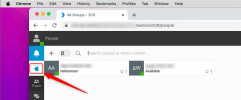
If you log in to the Web Client, you'll see a notification for the download. If you have already skipped that, then you can click the little apple icon on the top left.
 
Thank you for the quick answer. Unfortunately I didn't get the notification. I guess with "little apple icon" you refer to the macOS Apple menu? Maybe there is a direct download link for the app?
 
No, in the webclient you will find the icon. Not the Apple menu
 
I opened the web client and logged in, but I don't see the Apple icon. I am using Chrome 99 with macOS Monterey 12.3. What am I doing wrong?
 
1647522687724.png

For me its windows, but you will see there a Apple logo.
 
I unterstand what you mean, but the apple icon doesn’t show up in my web client.
 
Did you use the 3CX V18 or V16?
 
  • Like
Reactions: VasilisV_3CX
Hi @rascak,

As @bitn2 caught, you'll need to be on v18, for the icon to appear in the Web Client.
 
  • Like
Reactions: bitn2
Hi @rascak,

Can you create a new Extension on your PBX and PM me the details so I can log in?

Also what exact version of V18 are you using? Are you on Update 3? On Update 3 you should see the icon like this:

image (2).png
 
Last edited:
  • Like
Reactions: JackDan
Thank you all for the help. We are using 3CX as a cloud based PBX. Our provider has confirmed that the PBX is running on V18, but not the latest version. Obviously the features described are only supported on 18.0.3 or newer. So the PBX needs to be updated to the latest V18 version first.
 
Sure thing @rascak. Feel free to open another thread if you require any further information!
 
Status
Not open for further replies.