


- Joined
- Jun 2, 2020
- Messages
- 143
- Reaction score
- 101
Good afternoon,
I have a really... interesting issue I have noticed. The new desktop client is intermittantly showing an IP address rather than DNS name when creating a meeting. you can see on the below screenshot the desktop client is using a 10.x IP while the "webapp" shows the correct web address. The interesting thing is this is intermittant, and I have seen the new desktop app change back and forth (I didn't know it was intermittant which is why I believed it to be "resolved" yesterday).
The desktop client seems to switch between IP and DNS at random when relaunched. I have confirmed I have spit DNS setup on our internal DNS server. Since the certificate is not internal I am unable to have it go to an IP address without a certficate warning.
I can confirm, when opening a "quick" meeting, the add meeting it will reference my correct dns name and "click2talk" link.
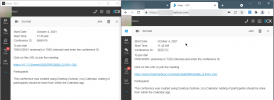
I have a really... interesting issue I have noticed. The new desktop client is intermittantly showing an IP address rather than DNS name when creating a meeting. you can see on the below screenshot the desktop client is using a 10.x IP while the "webapp" shows the correct web address. The interesting thing is this is intermittant, and I have seen the new desktop app change back and forth (I didn't know it was intermittant which is why I believed it to be "resolved" yesterday).
The desktop client seems to switch between IP and DNS at random when relaunched. I have confirmed I have spit DNS setup on our internal DNS server. Since the certificate is not internal I am unable to have it go to an IP address without a certficate warning.
I can confirm, when opening a "quick" meeting, the add meeting it will reference my correct dns name and "click2talk" link.


 .
.


