- Joined
- Oct 31, 2023
- Messages
- 7
- Reaction score
- 1
Hi,
I integrated 3CX with Freshdesk and it works great with the contacts. Contact name is displayed and the user is redirected to the Freshdesk contact page. I tried to so the same for Companies, as some clients are calling using a generic company number. Here is what i did :
1. Added a custom field "phone" on Freshdesk for companies
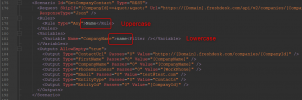
2. Created a custom XML config template with this endpoint :
Url="https://[Domain].freshdesk.com/api/v2/search/companies?query="tlphone:'[[Number].Replace("+","%2B&quot ]'""
]'""
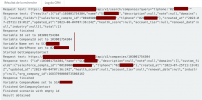
3. When I test a phone number with it, i get a well formated response as follow :
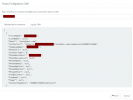
My issue is that when i try to call using a company number, it's beeing displayed well in the TEST window but not inside 3CX. So if a client calls using a company phone number, the company name isn't displayed.
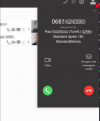
Am I missing something or it's just not possible to do ? It seems only the contact endpoint is beeing used by 3CX for caller identification in the background, no matter what i try to achieve inside the XML config (like passing the CompanyName inside FirstName, adding an email and so on).
Thanks for your kind help,
Guillaume
I integrated 3CX with Freshdesk and it works great with the contacts. Contact name is displayed and the user is redirected to the Freshdesk contact page. I tried to so the same for Companies, as some clients are calling using a generic company number. Here is what i did :
1. Added a custom field "phone" on Freshdesk for companies
2. Created a custom XML config template with this endpoint :
Url="https://[Domain].freshdesk.com/api/v2/search/companies?query="tlphone:'[[Number].Replace("+","%2B&quot
]'""3. When I test a phone number with it, i get a well formated response as follow :
My issue is that when i try to call using a company number, it's beeing displayed well in the TEST window but not inside 3CX. So if a client calls using a company phone number, the company name isn't displayed.
Am I missing something or it's just not possible to do ? It seems only the contact endpoint is beeing used by 3CX for caller identification in the background, no matter what i try to achieve inside the XML config (like passing the CompanyName inside FirstName, adding an email and so on).
Thanks for your kind help,
Guillaume