3CX Email Sending Issue – Resource Temporarily Unavailable

abdmarsomy

Customer
Joined
Dec 17, 2024
Messages
3
Reaction score
0
Having an issue with sending emails from 3CX. Tried both the 3CX SMTP server and Microsoft 365 (M365), but getting the same error in both cases:

"Resource temporarily unavailable"

  • Emails are not being sent at all.
  • Tested with 3CX SMTP settings and M365 SMTP settings, same result.
Things I've checked so far:

  1. Verified SMTP credentials and server settings for M365 (smtp.office365.com, port 587, TLS enabled).
  2. Tested connectivity to SMTP servers from the 3CX server (seems okay).
  3. Checked firewall settings to ensure SMTP traffic is not being blocked.
  4. Restarted the 3CX services and the server itself.
Despite all this, still getting the "Resource temporarily unavailable" error whenever an email is triggered.

Has anyone experienced this before? Any ideas on what could be causing this or what else I should check?
 
Having same issue, noticed that emails of missed calls are not delivering, same for fax.
 
Yeah, same here—emails for missed calls and user password resets aren’t going through either. It seems like a broader issue with the whole email functionality.

Did you notice when this started happening for you?
Also, are you using the 3CX SMTP server or M365 SMTP (or something else)?

I’m starting to think this might be a 3CX-side issue or maybe something with the email relay service. Curious if others are seeing the same thing.
 
Hi @abdmarsomy @SOFTISS

Is the issue you are observing happening with all emails or some of the emails leaving the system?
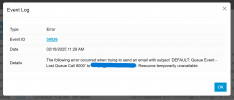
Also, where do you see the "Resource temporarily unavailable" error?
 
Hi @abdmarsomy @SOFTISS

Is the issue you are observing happening with all emails or some of the emails leaving the system?
Also, where do you see the "Resource temporarily unavailable" error?

Hello @AndreasPo_3CX

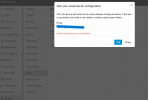
its happening with all emails leaving the system. and I attached pictures of the Resource temporarily unavailable error which is seen in the email test tab and the event log.
 

Attachments

  • S1.PNG
    S1.PNG
    126.5 KB · Views: 27
  • S2.PNG
    S2.PNG
    61.8 KB · Views: 27
For anyone else that might be reading this in the future, the issue was cause due to a DNS issue on the server. Fixing the DNS issue fixed the email issue as well.
 
  • Like
Reactions: abdmarsomy
DNS.... ITS ALWAYS DNS!!!
 
Can you explain how to fix the DNS issue on the server? Is this through 3CX admin portal?
 
@christopherp this will very much depend on the installation, first step is to check the PBX is able to access whatever DNS servers are configured on it, perhaps there is a firewall rule in the local network blocking that.
 

Latest Posts

Forum statistics

Threads
111,953
Messages
589,915
Members
164,851
Latest member
DrunkeMeister