3CX failover issue

Status
Not open for further replies.

DXC

Customer
Joined
Feb 15, 2021
Messages
62
Reaction score
4
Hi,

Debian GNU/Linux 9
3CX 16.0.7.1078 (on-premise)

I have deployed the passive/standby server using this doc https://www.3cx.com/docs/failover/

When I shutting down the active server the passive server doesn't take over the control. DNS resolves to the correct IP address, but the services don't start and users can't connect.
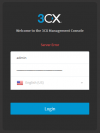
Besides, after the scheduling restore on the standby server I am not able to log in the Management Console.
 

Attachments

  • 3CX Phone System Management Console - Google Chrom.png
    3CX Phone System Management Console - Google Chrom.png
    13.4 KB · Views: 8
Instead of shut down the active server just stop one or two 3CX services and check. also make sure there no reach ability issue in between the Active/Passive servers.

For login issue make sure the management console service(systemctl status 3CXPhoneSystemMC01.service) running on the stand by server
 
Hi @DXC,

Can you reach the passive server by its IP to make sure you're on the correct machine? It should allow you to log in, if it doesn't then restart the server.
 
For login issue make sure the management console service(systemctl status 3CXPhoneSystemMC01.service) running on the stand by server
3CXPhoneSystemMC01.service was stopped during the scheduling restore and not started then. Is it OK?

Can you reach the passive server by its IP to make sure you're on the correct machine? It should allow you to log in, if it doesn't then restart the server.
I tried to reach by IP. When I restart the server the Management Console is available but there is no any restored config there and the Backup Location setting is cleared. I am confused.
 
3CXPhoneSystemMC01.service was stopped during the scheduling restore and not started then. Is it OK?
Yes, when configuring the passive server you should receive an email outlining which services are stopped as you've now switched the machine to a passive machine, however the management console service should automatically restart thereafter.

Are you able to SSH to the passive machine and check which services are running? You should see the same services running on the machine as the services that would show in the management console, as shown below:

1613381245254.png
 
I have started 3CXPhoneSystemMC01.service manually and I can log in now. But this is abnormally because the services should start automatically. How can I fix it?

Also the backup location is cleared after the service is started and I can't see any configuration restored (no extensions, no queues etc.).
 

Attachments

  • 3CX Phone System Management Console - Google Chrom.png
    3CX Phone System Management Console - Google Chrom.png
    8.7 KB · Views: 5
@DXC, are you using the same license key running the same version?

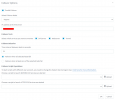
Can you tell me which settings you've selected here in the Failover section? Note please DO NOT include your public IP details in your response, simply tell us if you've filled it in?

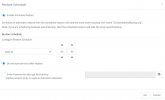
Next, can you tell us which settings you've selected in your Restore Schedule settings?
 

Attachments

  • 3CX Phone System Management Console - Google Chrom.png
    3CX Phone System Management Console - Google Chrom.png
    40.4 KB · Views: 16
  • 3CX Phone System Management Console - Google Chrom.png
    3CX Phone System Management Console - Google Chrom.png
    26.3 KB · Views: 16
As a test, can you manually backup from the active server and manually restore on the passive server? Does that work?

The passive server should have the above services (in my screenshot) running, and the manual restore will not start any of the other services.
 
As a test, can you manually backup from the active server and manually restore on the passive server? Does that work?
I did it before. The behavior is the same - the services are not started thereafter, the backup location is cleared and there is no any configuration after manual restart.
 
Hi @DXC, we've tested everything mentioned previously and we're unable to replicate the issue. Your backup location should definitely not be cleared after restart. May I suggest contacting a 3CX Partner to follow up?
 
Is there any script to start initial configuration on the passive server? I don't want to deploy from ISO again.
 
At present the ISO is the only supported method of installation. It's best to use it to ensure a clean install.
 
So, what is it?
3CXStartWizard.sh
 
I have re-deployed the passive server.
The issue is still present.

RestoreCmd.log stops on
Restoring file /var/lib/3cxpbx/Instance1/Data/Recordings/****

Is it possible that the cause of issue is a big backup (3.9 GB)? We keep the recordings for 90 days.
 
The issue was fixed by unchecking Recordings backup.
It seems like 3CX PBX is not designed for a big file size )
 
Hi @DXC,

Glad you resolved this. Just to clarify:

It seems like 3CX PBX is not designed for a big file size )
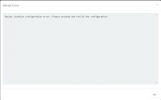
This is simply not true, 3CX handles backups of much larger sizes with no problem. The issue seems to be between your passive server and your backup location as stated in your screenshot previously with regards to backup location configuration being in error.

I advise using a more stable backup location, such as Google buckets and the issue should not happen again.
 
You are not right.

3CX gets the backup from FTP with no problem. The issue happens during zip unpacking/restoring.
The logs is true, not your assumptions.
 
You came to the Forum for assistance with your issue. We provided our professional opinion and service. Since you believe that you understand the nature of the problem better, we can no longer assist you.

I'd now suggest contacting a 3CX Partner to troubleshoot further.
 
  • Like
Reactions: Evolute IT
Status
Not open for further replies.