- Joined
- Aug 11, 2022
- Messages
- 9
- Reaction score
- 0
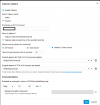
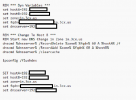
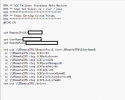
I am having issues with the 3cx failover system. I have two servers on the same LAN behind different public IPs. Phones are provisioned by FQDN. I have the active and passive servers set up correctly, but that is about all that works. For starters, the failover will not trigger when any of the services stop (see attached). I have stopped services on the main server as well as completely powered it off in an attempt to trigger the failover. Secondly, the scripts do not work when I attempt to run them on their own for testing purposes. They do run without any errors. They do not change the A record or stop services on the primary server. I have attached the scripts that I am using.
I know it is not ideal, but I did join the failover server to the domain when initially testing the setup. I thought using the domain admin account would be needed to change the DNS record. Any help would be appreciated.
I know it is not ideal, but I did join the failover server to the domain when initially testing the setup. I thought using the domain admin account would be needed to change the DNS record. Any help would be appreciated.
- 3CX Version, Enterprise Annual 20.0.5.551
- Server OS: Windows 11 Pro
- Is the 3CX Server Hosted and where? On Premise
- Provisioning Method: Local
- Trunk Provider or VoIP Gateway Make/Model: Bandwidth
- Has the Firewall Checker passed: YES
- Are custom Phone Templates being used: NO