- Joined
- Oct 16, 2019
- Messages
- 12
- Reaction score
- 2
Hi,
I’ve spoken with the team who manages our pfsense firewall here and we’ve opened all the necessary ports for the firewall checker, as listed below.
The machine is in a network where NAT does not take place. The IP of the 3CX installation is the public IP. We can control the ports that can reach that IP through the rules listed below:
Source = 192.8.XX.XXX.XXX:
-A FORWARD -s 192.8XX.XXX.XXX -p tcp -m multiport --dports 25,80,110,443,465,587,2195,2196,4505,4506 -j ACCEPT
-A FORWARD -s 192.8XX.XXX.XXX -p udp -m multiport --dports 53,123,5000:50000 -j ACCEPT
Destination = 192.8.XX.XXX.XXX:
-A FORWARD -d 192.8XX.XXX.XXX -p tcp -m multiport --dports 80,443,2195,2196,5061,5090,6274,9000:10999 -j ACCEPT
-A FORWARD -d 192.8XX.XXX.XXX -p udp -m multiport --dports 7,5060,5090,6274,5000:50000 -j ACCEPT
However, I’m still getting an error in the firewall checker UNLESS I open all ports on our firewall to this IP address.
I’m running out of ideas for which ports I need to open, all these ports are listed in the 3CX firewall configuration document online so… idk https://www.3cx.com/docs/manual/firewall-router-configuration/
I have also looked here and performed the checks as described. https://www.3cx.com/docs/firewall-checker/
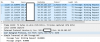
Test 1 fails consistently, as seen in this packet capture:
Any help would be greatly appreciated,
Daniel
I’ve spoken with the team who manages our pfsense firewall here and we’ve opened all the necessary ports for the firewall checker, as listed below.
The machine is in a network where NAT does not take place. The IP of the 3CX installation is the public IP. We can control the ports that can reach that IP through the rules listed below:
Source = 192.8.XX.XXX.XXX:
-A FORWARD -s 192.8XX.XXX.XXX -p tcp -m multiport --dports 25,80,110,443,465,587,2195,2196,4505,4506 -j ACCEPT
-A FORWARD -s 192.8XX.XXX.XXX -p udp -m multiport --dports 53,123,5000:50000 -j ACCEPT
Destination = 192.8.XX.XXX.XXX:
-A FORWARD -d 192.8XX.XXX.XXX -p tcp -m multiport --dports 80,443,2195,2196,5061,5090,6274,9000:10999 -j ACCEPT
-A FORWARD -d 192.8XX.XXX.XXX -p udp -m multiport --dports 7,5060,5090,6274,5000:50000 -j ACCEPT
However, I’m still getting an error in the firewall checker UNLESS I open all ports on our firewall to this IP address.
I’m running out of ideas for which ports I need to open, all these ports are listed in the 3CX firewall configuration document online so… idk https://www.3cx.com/docs/manual/firewall-router-configuration/
I have also looked here and performed the checks as described. https://www.3cx.com/docs/firewall-checker/
Test 1 fails consistently, as seen in this packet capture:
Any help would be greatly appreciated,
Daniel