- Joined
- Jan 24, 2022
- Messages
- 2
- Reaction score
- 0
I am having a heck of a time trying to get a Fanvil i18S provisioned with our 3CX hosted instance.
i18S was configured for DHCP, the admin password was changed, then upgraded to the latest 2.8.2.7020 firmware. The phone was added in the phone provisioning tab, Direct SIP was selected, mac address entered, unchecked "disallow use of extensions outside...", BLF button was configured.
Then the i18S was configured for the Static Provisioning Server with the filename as <mac_address>.cfg and extension and voicemail PIN. After the i18S reboots, I see the user/phone join 3CX and calls function. Everything looks great, almost.
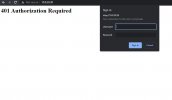
Now, after the i18S has rebooted with it's remote config, any attempts to login to the i18S internal website by IP, show a basic authentication prompt. The default password and new admin password are not accepted. After 3 failed attempts at basic authentication, it returns a blank page that says "401 authorization required".
Seeing that this firmware version was showing in 3CX as "unsupported", I reset the i18S config via telnet menu and reverted firmware to the "supported" version listed on this page: i18S2.4.0.6516T20190402180834.z
https://www.3cx.com/sip-phones/fanvil-sip-doorphones/
After performing all the steps above again, with the 2.4 firmware, I had the same result after the phone was configured by 3CX. Oddly, 3CX still complained that this was an unsupported firmware version even though it is listed in the guide above.
I've already tried contacting Fanvil support, and they instructed me that the issue was because I need to use the 2.8.2.7020 firmware with 3CX and to perform a packet capture from the i18S "Tools" page.
Well, I tried everything all over again, resetting the config, upgrading to 2.8.2.7020, all the above configuration steps. The packet capture didn't work across the phone reboot as instructed by Fanvil support (because the internal site starts returning 401 errors) and now I'm back where I started after investing way too much time into this.
While technically the phone does work despite the warning from 3CX, but I need to be able to retain access to the i18S configuration by local IP should we need to change any settings in the future.
Fanvil support is not helpful at this point. I guess I have no support from 3CX. What do I do?
At this point I'm almost ready to return the i18S and find a different IP door station with no keypad, but I can't locate any other similar "supported" devices for hosted 3CX.
Has anyone else experienced similar "401 authorization required" errors from a Fanvil device?
i18S was configured for DHCP, the admin password was changed, then upgraded to the latest 2.8.2.7020 firmware. The phone was added in the phone provisioning tab, Direct SIP was selected, mac address entered, unchecked "disallow use of extensions outside...", BLF button was configured.
Then the i18S was configured for the Static Provisioning Server with the filename as <mac_address>.cfg and extension and voicemail PIN. After the i18S reboots, I see the user/phone join 3CX and calls function. Everything looks great, almost.
Now, after the i18S has rebooted with it's remote config, any attempts to login to the i18S internal website by IP, show a basic authentication prompt. The default password and new admin password are not accepted. After 3 failed attempts at basic authentication, it returns a blank page that says "401 authorization required".
Seeing that this firmware version was showing in 3CX as "unsupported", I reset the i18S config via telnet menu and reverted firmware to the "supported" version listed on this page: i18S2.4.0.6516T20190402180834.z
https://www.3cx.com/sip-phones/fanvil-sip-doorphones/
After performing all the steps above again, with the 2.4 firmware, I had the same result after the phone was configured by 3CX. Oddly, 3CX still complained that this was an unsupported firmware version even though it is listed in the guide above.
I've already tried contacting Fanvil support, and they instructed me that the issue was because I need to use the 2.8.2.7020 firmware with 3CX and to perform a packet capture from the i18S "Tools" page.
Well, I tried everything all over again, resetting the config, upgrading to 2.8.2.7020, all the above configuration steps. The packet capture didn't work across the phone reboot as instructed by Fanvil support (because the internal site starts returning 401 errors) and now I'm back where I started after investing way too much time into this.
While technically the phone does work despite the warning from 3CX, but I need to be able to retain access to the i18S configuration by local IP should we need to change any settings in the future.
Fanvil support is not helpful at this point. I guess I have no support from 3CX. What do I do?
At this point I'm almost ready to return the i18S and find a different IP door station with no keypad, but I can't locate any other similar "supported" devices for hosted 3CX.
Has anyone else experienced similar "401 authorization required" errors from a Fanvil device?