Solved 3cx hosted - App 3cx - loopback

Status
Not open for further replies.

jnavarro

Customer
Joined
Jan 12, 2022
Messages
4
Reaction score
0
With provisioning file, windows app extensions appears registered with public IP and loopback IP, and calls fails when system try to call [email protected]:5080

If put fqdn in my location "office" it works fine, but this change is manualy

Sorry for may english
 
With provisioning file, windows app extensions appears registered with public IP and loopback IP, and calls fails when system try to call [email protected]:5080

If put fqdn in my location "office" it works fine, but this change is manualy

Sorry for may english
Hi!

Can you check in this file to see if there is a line with your FQDN pointing to 127.0.0.1 ?
c:\Windows\System32\drivers\etc\hosts

If there, is this PC the PC you have also installed the 3CX Server software on?

Also could you please send a screenshot where you see 127.0.0.1 so we can better understand?
 
With provisioning file, windows app extensions appears registered with public IP and loopback IP, and calls fails when system try to call [email protected]:5080

If put fqdn in my location "office" it works fine, but this change is manualy

Sorry for may english

1642067611153.png

1642067689320.png

1642067868583.png

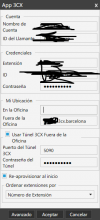
Provisioning file leave empty "in office" and 3cx admin show 2 ip "loopback" and wan/lan depending if 3cx server is hosted or on premise.
 
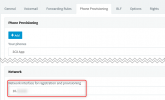
Try to edit your Extension in the Management Console and in the Phone Provisioning tab, in the network drop-down select the LAN IP of your 3CX Server:
1642069311211.png

Once you do this, reprovision your 3CX Client. Does it then show the correct value in the "In Office" field?
 
Try to edit your Extension in the Management Console and in the Phone Provisioning tab, in the network drop-down select the LAN IP of your 3CX Server:
View attachment 27081

Once you do this, reprovision your 3CX Client. Does it then show the correct value in the "In Office" field?
"in office" always was empty on hosted 3cx, then always show 127.0.0.1 with all network interfaces possibilities
 
With 3CX Hosted the In office field is actually always empty since you can never be "in office" with 3CX Hosted because the PBX is in the cloud.

Are you saying that the Windows App does not work if "in office" is empty?
 
With 3CX Hosted the In office field is actually always empty since you can never be "in office" with 3CX Hosted because the PBX is in the cloud.

Are you saying that the Windows App does not work if "in office" is empty?
Yes this is that i was saying, that 3cx app appears resgistered with loopback and wan ip addresses and when try to call in logs i says

13/01/2022 17:02:00 - [CM503003]: Call(C:46): Call to <sip:[email protected]:0> has failed; Cause: 487 Request Terminated/INVITE from 127.0.0.1:5483
 
I'll PM you shortly regarding this.
 
As per our PM conversation, the issue does not seem to occur anymore so please let us know once it does.
 
Status
Not open for further replies.

Forum statistics

Threads
112,025
Messages
590,367
Members
164,977
Latest member
jasimbutt82