3CX Hosted - Telnyx SMS

Status
Not open for further replies.

Scott.Stiffler

Customer
Joined
Jun 27, 2021
Messages
6
Reaction score
3
I'm trying to get SMS working through Telnyx to 3CX. I have the messaging connection created and the test passes when I run it. I see the outbound text from 3CX hit Telnyx Webhook but the message never arrives to the carrier cell phone. On an inbound text from a carrier cell phone I'm not seeing any indication that it is making it to 3CX. I have a ticket opened with Telnyx to see if they find anything from their side but I also found the post below referencing needing to allow port 5001 to resolve the issue. I am running 3CX Hosted and do not see an option to allow additional ports through, is there a log that can be pulled that might indicate if the issue is on the 3CX side or Telnyx?

https://www.3cx.com/community/threads/sms-messaging-not-receiving-via-telnyx.82246/#post-381354
 
The port that should be open is essentially the HTTPS port of your 3CX PBX. If it were set to be 5001, then it would be 5001, in your case however, since you are using a 3CX Hosted instance, it should be TCP port 443. In any case, Port configuration is automatically managed by 3CX when using a 3CX Hosted instance so it's already open, otherwise you wouldn't be able to connect to the Management Console nor pass the SMS Test.

Regarding Outbound messages, since you see them hitting Telnyx you might want to wait and see what Telnyx says.

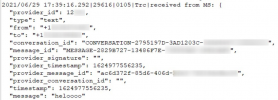
For Inbound messages, make absolutely sure that, as mentioned in the guide, the number entered in 3CX is in E164 formatting (no spaces or dashed). If still you cannot determine what the issue is, you could check the Management Console Log for something similar to the following entry:

1624977683806.png


If you do not see this then it is not reaching the 3CX PBX, in which case, you might again want to wait for a response from Telnyx to hopefully shed some light on the matter.

Note: Before reproducing the issue and checking the log, do remember to enable Verbose Logging mode from within Dashboard >> Activity Log >> Settings.
 
Thank you, I will continue to troubleshoot with Telnyx.
 
Telnyx found an issue on their side that they had to resolve for this
 
Excellent!

So I gather everything is in order now?
 
Status
Not open for further replies.

Forum statistics

Threads
112,065
Messages
590,584
Members
165,019
Latest member
rsaldin@advancedbrainspin