3cx license server blocked by the firewall

Status
Not open for further replies.

PMedia

Customer
Joined
Apr 15, 2024
Messages
2
Reaction score
0
3CX PRO (18.0) Self Managed - on my System Dashboard, the expiration date is 2025. Going to the 3CX Dashboard (http://my.ip.number: port) it says that the license has expired.
The problem is the firewall that blocks connections to the 3cx license server (and it is supposed to stay that way).
I have a question: do I risk turning off my 3CX? Can I safely ignore the alarm in the 3CX Dashboard (not the systems).
 
3CX PRO (18.0) Self Managed - on my System Dashboard, the expiration date is 2025. Going to the 3CX Dashboard (http://my.ip.number: port) it says that the license has expired.
The problem is the firewall that blocks connections to the 3cx license server (and it is supposed to stay that way).
I have a question: do I risk turning off my 3CX? Can I safely ignore the alarm in the 3CX Dashboard (not the systems).
Dude just open the outbound connection to "activate.3cx.com"

It is a requirement anyway. The system could stop working at any time if it cannot activate.
 
If the PBX is not allowed to access the licensing server you do do run the risk of deactivating your 3CX server. You would need to allow access to the activations server.

Do note that this is an outgoing connection, and you can do an NSLOOKUP of the activate.3cx.com IP address and allow access from your server only to this IP for activation purposes. The activation server wiil NOT establish a connection back to your PBX, only respond to its requests.
 
  • Like
Reactions: Evolute IT
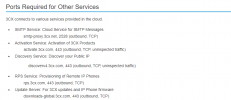
Ensure that traffic is allowed as it is also listed in the guideline:

2024-08-07_08h49_43.png
 
Status
Not open for further replies.

Members Online Now

Forum statistics

Threads
111,832
Messages
589,284
Members
164,662
Latest member
DejanMDS