- Joined
- May 20, 2020
- Messages
- 10
- Reaction score
- 1
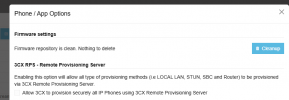
I am unclear how the new 3CX RPS option under Admin -> Phones -> Options works.

My understanding of RPS is that when a phone is provisioned in 3CX, 3CX then adds an entry for that phones MAX on the RPS server of the phones manufacturer. When that phone boots, it "phones home" to the manufacturer's RPS server, received the entry that 3CX added, and proceeds to download the configuration file.
This 3CX docs page seem to indicate that the new 3CX RPS feature works on the local lan. However, how doe that happen if the phone is trying to contact it's manufacturer's RPS server.
My understanding of RPS is that when a phone is provisioned in 3CX, 3CX then adds an entry for that phones MAX on the RPS server of the phones manufacturer. When that phone boots, it "phones home" to the manufacturer's RPS server, received the entry that 3CX added, and proceeds to download the configuration file.
This 3CX docs page seem to indicate that the new 3CX RPS feature works on the local lan. However, how doe that happen if the phone is trying to contact it's manufacturer's RPS server.
Turning off RPS - using Local IP
By default the V20 setup provisions phones securely on the local LAN via RPS and publishes provisioning information to the 3CX RPS server. If you don’t want to use RPS, you can switch off RPS by going to Phones > Options