3CX logged calls in HubSpot: How to assign them to an agent?

Status
Not open for further replies.

SantiagoBS

New User
Joined
Sep 17, 2021
Messages
4
Reaction score
1
Hi all

We use 3CX with HubSpot as CRM. 3CX automatically logs all Calls in the HS Activitiy Feed.

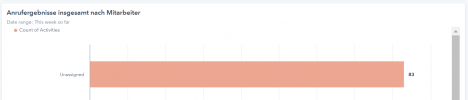
Current Problem: All those 3CX Calls are shown in the HubSpot-Dashboard as Unassigned. See dashboard-screenshot:
1631912595922.png

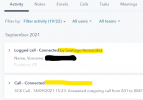
On the next screenshot (Activity Feed) you see a call log that was logged manually (first note) and another one that directly came from 3CX.
As you can see, the Subject of both logs are different. The first one (Subject: Logged call - Connected by Santiago Hernandez) is correctly shown in the dashboard (=assigned) and the second one (Subject: Call - Connected) is shown as unassigned.
1631912105574.png

Question: Do any of you have experience with this issue and know how the 3CX Call Logs can be directly assigned to an agent (in the subject)?

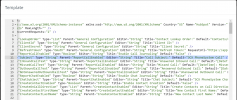
Can we maybe solve this through the following Template?
1631911834923.png

Thank you and best regards, Santiago
 
  • Like
Reactions: edossantos
Hello @SantiagoBS,

Please note that this is something that we will be adding to the official 3CX template, probably in 3CX v18 Update 2. We will do the mapping using the email address configured for the 3CX extension, and the email address of the agent in HubSpot.

If you're not in a hurry and can wait until Update 2 becomes available, then you will be using the official 3CX template, and wouldn't need to make manual changes to the template.
 
  • Like
Reactions: Evolute IT
Hello @SantiagoBS,

Please note that this is something that we will be adding to the official 3CX template, probably in 3CX v18 Update 2. We will do the mapping using the email address configured for the 3CX extension, and the email address of the agent in HubSpot.

If you're not in a hurry and can wait until Update 2 becomes available, then you will be using the official 3CX template, and wouldn't need to make manual changes to the template.
Hi @edossantos

Thank you for your reply. This are good news :)

Nevertheless, we would like to make the needed changes to our template as we are making over 200 calls per day and the dashboard statistics are important to us.

Can you please help us? Thank you!!
 
Hi @edossantos

Thank you for your reply. This are good news :)

Nevertheless, we would like to make the needed changes to our template as we are making over 200 calls per day and the dashboard statistics are important to us.

Can you please help us? Thank you!!
This is how you should do this for the ReportCall scenario:
XML:
    <Scenario Id="ReportCall" Type="REST">
      <Request SkipIf="[ReportCallEnabled]!=True||[EntityId]==&quot;&quot;"
                       Url="https://api.hubapi.com/owners/v2/owners?email=[AgentEmail]"
                       RequestType="Get" ResponseType="Json" />
      <Rules>
        <Rule Type="Any" Ethalon="">ownerId</Rule>
      </Rules>
      <Variables>
        <Variable Name="OwnerId" Path="ownerId" />
      </Variables>
      <Outputs AllowEmpty="false" Next="CreateCallActivity">
      </Outputs>
    </Scenario>
    <Scenario Id="CreateCallActivity" Type="REST">
      <Request Url="https://api.hubapi.com/engagements/v1/engagements"
                       RequestContentType="application/json" RequestEncoding="Json"
                       RequestType="Post" ResponseType="Json">
        <PostValues Key="">
          <Object Key="engagement">
            <Value Key="active" Type="Boolean">True</Value>
            <Value Key="type" Type="String">CALL</Value>
            <Value Key="ownerId" Type="Integer">[OwnerId]</Value>
          </Object>
          <Object Key="associations">
            <Array Key="contactIds" If="[EntityType]==Contacts">
              <Value Key="" Type="Integer">[EntityId]</Value>
            </Array>
            <Array Key="companyIds" If="[EntityType]==Companies">
              <Value Key="" Type="Integer">[EntityId]</Value>
            </Array>
          </Object>
          <Object Key="metadata">
            <Value Key="toNumber" Type="String" If="[CallType]==Inbound||[CallType]==Missed">[Agent]</Value>
            <Value Key="toNumber" Type="String" If="[CallType]==Outbound||[CallType]==Notanswered">[Number]</Value>
            <Value Key="fromNumber" Type="String" If="[CallType]==Inbound||[CallType]==Missed">[Number]</Value>
            <Value Key="fromNumber" Type="String" If="[CallType]==Outbound||[CallType]==Notanswered">[Agent]</Value>
            <Value Key="status" Type="String">COMPLETED</Value>
            <Value Key="durationMilliseconds" Type="Integer" If="[CallType]==Inbound||[CallType]==Outbound">[[[DurationTimespan].get_TotalMilliseconds()].ToString("F0")]</Value>
            <Value Key="durationMilliseconds" Type="Integer" If="[CallType]==Missed||[CallType]==Notanswered">0</Value>
            <Value Key="body" Passes="2" Type="String" If="[CallType]==Inbound">[Subject] - [InboundCallText]</Value>
            <Value Key="body" Passes="2" Type="String" If="[CallType]==Missed">[Subject] - [MissedCallText]</Value>
            <Value Key="body" Passes="2" Type="String" If="[CallType]==Outbound">[Subject] - [OutboundCallText]</Value>
            <Value Key="body" Passes="2" Type="String" If="[CallType]==Notanswered">[Subject] - [NotAnsweredOutboundCallText]</Value>
            <Value Key="disposition" Type="String" If="[CallType]==Inbound||[CallType]==Outbound">f240bbac-87c9-4f6e-bf70-924b57d47db7</Value>
            <Value Key="disposition" Type="String" If="[CallType]==Missed||[CallType]==Notanswered">73a0d17f-1163-4015-bdd5-ec830791da20</Value>
          </Object>
        </PostValues>
      </Request>
    </Scenario>

First you search the HubSpot owner by email, and then you chain this response to a new scenario that creates the engagement.

You should do the same for chat.
 
  • Like
Reactions: Evolute IT
thank you very much @edossantos . We will try out!
 
  • Like
Reactions: edossantos
Hi @edossantos

Hope you are well.

Just checking in on this before I do anything on my end. We are in the same situation regarding calls being logged as "Unassigned"

We have just updated to the 18.0.237 yesterday and would like to know if this has been updated yet.

additionally will I need to redo the Hubspot Auth Setup if so.

Looking forward to your response
 
Hi @edossantos

Hope you are well.

Just checking in on this before I do anything on my end. We are in the same situation regarding calls being logged as "Unassigned"

We have just updated to the 18.0.237 yesterday and would like to know if this has been updated yet.

additionally will I need to redo the Hubspot Auth Setup if so.

Looking forward to your response
No, the template provided by 3CX doesn't include this change yet. We're planning to include this in 3CX v18 Update 2, which is the next update of 3CX.
 
  • Like
Reactions: Evolute IT
This is how you should do this for the ReportCall scenario:
XML:
    <Scenario Id="ReportCall" Type="REST">
      <Request SkipIf="[ReportCallEnabled]!=True||[EntityId]==&quot;&quot;"
                       Url="https://api.hubapi.com/owners/v2/owners?email=[AgentEmail]"
                       RequestType="Get" ResponseType="Json" />
      <Rules>
        <Rule Type="Any" Ethalon="">ownerId</Rule>
      </Rules>
      <Variables>
        <Variable Name="OwnerId" Path="ownerId" />
      </Variables>
      <Outputs AllowEmpty="false" Next="CreateCallActivity">
      </Outputs>
    </Scenario>
    <Scenario Id="CreateCallActivity" Type="REST">
      <Request Url="https://api.hubapi.com/engagements/v1/engagements"
                       RequestContentType="application/json" RequestEncoding="Json"
                       RequestType="Post" ResponseType="Json">
        <PostValues Key="">
          <Object Key="engagement">
            <Value Key="active" Type="Boolean">True</Value>
            <Value Key="type" Type="String">CALL</Value>
            <Value Key="ownerId" Type="Integer">[OwnerId]</Value>
          </Object>
          <Object Key="associations">
            <Array Key="contactIds" If="[EntityType]==Contacts">
              <Value Key="" Type="Integer">[EntityId]</Value>
            </Array>
            <Array Key="companyIds" If="[EntityType]==Companies">
              <Value Key="" Type="Integer">[EntityId]</Value>
            </Array>
          </Object>
          <Object Key="metadata">
            <Value Key="toNumber" Type="String" If="[CallType]==Inbound||[CallType]==Missed">[Agent]</Value>
            <Value Key="toNumber" Type="String" If="[CallType]==Outbound||[CallType]==Notanswered">[Number]</Value>
            <Value Key="fromNumber" Type="String" If="[CallType]==Inbound||[CallType]==Missed">[Number]</Value>
            <Value Key="fromNumber" Type="String" If="[CallType]==Outbound||[CallType]==Notanswered">[Agent]</Value>
            <Value Key="status" Type="String">COMPLETED</Value>
            <Value Key="durationMilliseconds" Type="Integer" If="[CallType]==Inbound||[CallType]==Outbound">[[[DurationTimespan].get_TotalMilliseconds()].ToString("F0")]</Value>
            <Value Key="durationMilliseconds" Type="Integer" If="[CallType]==Missed||[CallType]==Notanswered">0</Value>
            <Value Key="body" Passes="2" Type="String" If="[CallType]==Inbound">[Subject] - [InboundCallText]</Value>
            <Value Key="body" Passes="2" Type="String" If="[CallType]==Missed">[Subject] - [MissedCallText]</Value>
            <Value Key="body" Passes="2" Type="String" If="[CallType]==Outbound">[Subject] - [OutboundCallText]</Value>
            <Value Key="body" Passes="2" Type="String" If="[CallType]==Notanswered">[Subject] - [NotAnsweredOutboundCallText]</Value>
            <Value Key="disposition" Type="String" If="[CallType]==Inbound||[CallType]==Outbound">f240bbac-87c9-4f6e-bf70-924b57d47db7</Value>
            <Value Key="disposition" Type="String" If="[CallType]==Missed||[CallType]==Notanswered">73a0d17f-1163-4015-bdd5-ec830791da20</Value>
          </Object>
        </PostValues>
      </Request>
    </Scenario>

First you search the HubSpot owner by email, and then you chain this response to a new scenario that creates the engagement.

You should do the same for chat.
do we just add this XML to the end of our current XML?
 
do we just add this XML to the end of our current XML?
No, open the XML file in a Notepad++/VSCode and replace the current "reportcall" scenario, along with the following one, with that one.
 
No, open the XML file in a Notepad++/VSCode and replace the current "reportcall" scenario, along with the following one, with that one.
Thanks for that - is there any scopes that need to updated as well?
 
thanks for you help
 
Status
Not open for further replies.

Forum statistics

Threads
112,147
Messages
590,961
Members
165,167
Latest member
Finatra.us