3CX (Microsoft App) - how to disable ring on computer?

Status
Not open for further replies.

TownTech

Bronze Partner
Joined
Feb 14, 2023
Messages
107
Reaction score
12
I have installed the latest 3CX App from the Microsoft Store in our computers, so we can chat, etc with clients.
But everytime the phone rings, every computer in the office is ringing. We don't want to disable the sound for the whole computer, but just for the 3CX App.
Anyone know how to do this?
 
Screenshot 2024-09-10 142758.png

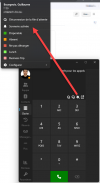
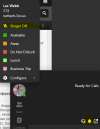
Click on your image in the top left of the app
 
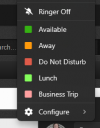
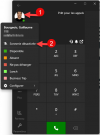
Simply press the bell or click on your avatar and select "Ringer off."


1725996646125.png


1725996780337.png
 
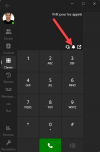
Just noticed what might be a bug. My ringer shows OFF in one menu and ON in the other. If I toggle either switch, the other goes opposite.

1725997438997.png
 
  • Like
Reactions: Evolute IT
Just noticed what might be a bug. My ringer shows OFF in one menu and ON in the other. If I toggle either switch, the other goes opposite.

[image]

I believe it's a matter of interpretation.

In the menu, we can see an action button (not a status).
Therefore, it appears as "Click here to turn off the ringer," similar to status buttons like Available, Away, Do Not Disturb... These are "actions."

On the main screen, it is a state with a shortcut. If you click on it, its state changes.

The letter Q becomes darker when logging out of the queues, to indicate its current state (logged out).
 
Strange behavior though. When I click on the main screen icon, it appears in the "off" position with a line through it. Then the action button changes to "Ringer on"

I don't have an issue with it, I've always used the action menu and never had a problem.

Les
 
Strange behavior though. When I click on the main screen icon, it appears in the "off" position with a line through it. Then the action button changes to "Ringer on"

I don't have an issue with it, I've always used the action menu and never had a problem.

Les

Indeed, this could be confusing.
3CX should add the word "Set" in the menu.

Thus, when the bell with the bar is displayed on the main screen to indicate it is on silent, the menu would read "Set the ringer to On" instead of "Ringer On." ( So, "Click here" for Set the ringer to On )

When the bell without the bar is displayed on the main screen to indicate the ringer is active, the menu would read "Set the ringer to Off" instead of "Ringer Off." ( So, "Click here" for Set the ringer to Off )


This is likely a change that needs to be made in the dictionary.
@ThomB_3CX here is a feedback regarding the dictionary (translation) that might interest you :
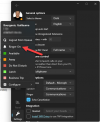


1726001800168.png


I suggest that the text be modified to "action term" rather than "the state".
It gives the impression that the ringer is currently set to "ON" but that is not the case.

The button should say "Activate Ringer" instead of "Ringer (is) On"


It is the same for French.
It states that the "ringer (is) activated" ( Sonnerie activée ) , but it should instead describe the action of Activating the ringer (Activer la Sonnerie) . For other languages, I prefer to refrain as I might unintentionally use a vulgar word without being aware. :oops:

1726002965737.png
 
  • Like
Reactions: Evolute IT
@Guillaume Bourgeois thanks for your feedback on this.
Will discuss this internally as we opted to use the same text as in the Webclient.
 
Thanks guys! your help made it easy
 
Status
Not open for further replies.

Members Online Now

Forum statistics

Threads
111,835
Messages
589,289
Members
164,665
Latest member
dominik.pepel