3CX Mobile App is not connecting

Status
Not open for further replies.

apitsos

SOHO User
Basic Certified
Joined
Mar 27, 2020
Messages
184
Reaction score
52
Hi again!

I am facing a strange problem. I am trying to configure some mobile phones with 3CX and I am getting the message "Could not connect to the server", no matter if I am connecting to the local network via Wi-Fi or to the mobile network via 3G.
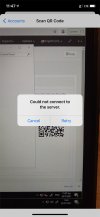
IMG_9101_web-friendly.jpg

It is obvious that i am allowing the necessary ports on the firewall of the 3CX PBX itself and on the firewall we have for accesing the infrastructure from outside (the Internet).

Is there something else that I could check?


With kind regards,
Angelos Pitsos
 
Double check your firewall rules - as the application needs 3CX https and tunnel ports to be open

https://www.3cx.com/docs/manual/firewall-router-configuration/

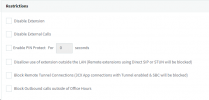
Under options for the extension - check 'Block Remote Tunnel Connections (3CX App connections with Tunnel enabled & SBC will be blocked)' is unticked


1627551588941.png
 
This may be related to the QR Code you're using.

• I see you've accessed the Management Console. Have you used the FQDN or Local IP Address to access it?

• When you say that the device is connected to the local network, do you mean the same LAN as the PBX is on?

• Did you try both the LANs Wi-fi and LTE connection with the same exact QR code in the Management Console?

• Does it work fine if you using the configuration file found in the welcome email?
 
Hi @Saqqara,

Thanks a lot for your response. I am allowing the necessary ports on the firewall and the Tunnel port. I also not having selected this option on the extensions that I am about to configure on the mobile app.

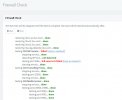
But you created some concerns with your first sentence, so I did a Firewall check from within the dashboard, and here are the results:

CamperGaz-3CX-Firewall-Check-001_2021-07-29.jpg

I am wondering how that is happening, since the firewall of the PBX (Windows firewall) allows the port 5060. But I don't want to allow port 5060 on the firewall from outside.


With kind regards,
Angelos Pitsos
 
I am wondering how that is happening, since the firewall of the PBX (Windows firewall) allows the port 5060. But I don't want to allow port 5060 on the firewall from outside.
If you're not allowing traffic on Port 5060 from outside then the message you're seeing when running the firewall test is expected. That said, the 3CX Mobile clients do not need port 5060 as they use port 5090 for SIP Signaling and RTP traffic and use the HTTPS port (default 443/5001) for provisioning, meaning they should've still worked.

Could you provide the information mentioned in my previous response?
 
Hi @ChrisC_3CX,

My apologies, I didn't notice the previous message. Here are the answers:


• I see you've accessed the Management Console. Have you used the FQDN or Local IP Address to access it?
> I use is ON the PBX itself (via the local browser), with the address http://localhost:35500 (I have a custom port). I had no idea that the QR code could be different, based on how I open the Dashboard.

• When you say that the device is connected to the local network, do you mean the same LAN as the PBX is on?
> Yes, exactly!

• Did you try both the LANs Wi-fi and LTE connection with the same exact QR code in the Management Console?
> Yes and didn't work. Now, I opened the Dashboard from my local machine using the FQDN address (not local IP or something else) and I could register the phone, but only via LTE. With Wi-Fi I can't. Not even with Guest Wi-Fi, which has only Internet access.

• Does it work fine if you using the configuration file found in the welcome email?
I haven't tried to use the configuration file. How can I do that on the mobile phone? By sending it via email to the user's email account and open it from there? Will that work?

Thanks a lot for your time.


With kind regards,
Angelos Pitsos
 
I had no idea that the QR code could be different, based on how I open the Dashboard.
Yes, it will change depending on how you access the Management Console/Webclient.

Now, I opened the Dashboard from my local machine using the FQDN address (not local IP or something else) and I could register the phone, but only via LTE. With Wi-Fi I can't. Not even with Guest Wi-Fi, which has only Internet access.
Doing this means the 3CX Mobile client will try to contact the 3CX PBX on its Public IP. The fact that it worked on the LTE connection but not on the Wifi connection(same LAN) may mean that there are network restrictions in place preventing connections to be made to the same public IP of that network.

I haven't tried to use the configuration file. How can I do that on the mobile phone? By sending it via email to the user's email account and open it from there? Will that work?
Using the configuration file should indeed work as it contains both the local and FQDN address of the 3CX PBX. That way, if one should fail the other will be tested.
 
  • Like
Reactions: apitsos
Status
Not open for further replies.

Latest Posts

Forum statistics

Threads
111,982
Messages
590,120
Members
164,909
Latest member
Jacob.Ive