3CX Mobile app not ringing after closed app (IOS and Android)

Status
Not open for further replies.

Keng Soon

Forum User
Joined
Oct 7, 2019
Messages
7
Reaction score
0
Hi, I have installed 3CX v16 on android and ios. However i lock screen my phone, the 3CX app will not keep runing. Tried call also not ringing on my phone.
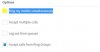
Another things the option in Extension>Forwarding Rules>Ring my mobile simultaneously (when i enable this option my phone will ring but not in app. Is this will charge my phone bill?)
 

Attachments

  • forwarding.JPG
    forwarding.JPG
    15.4 KB · Views: 20
Hi Keng

Please tell us the exact versions of your PBX and your iOS and Android apps that you use.

Ensure that "Enable PUSH for smartphones" has been ticked in your extension under Provisioning > 3CX App

And yes, if you enable ring my mobile simultaneously then the trunk will be charged for the call.
 
Hi John, I have enable PUSH for smartphones setting.

Where can i check my versions of PBX ?
IOS: 16.0.1.606
Android:16.0.0.35
 
Or "PUSH Certificates" expired will cause the smartphone not wake up ?
 
No iOS PUSH certificates will mean that no PUSH messages will be delivered.

If you have iOS certificates that need updating, they will appear in the updates section. If not, then you are already updated.

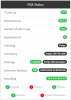
Your PBX version appears on the right box, as soon as you log in to the 3CX management console
 
12556
I had enable the enable PUSH for smartphones setting in all extension, but still not working.
 
I use this service is work for only 1 unit android device. Google Firebase Cloud Messaging for 3CX Client for Android (FCM)
 
It's the right box like here. Please hide your sensitive information like I did before you post

12564
 
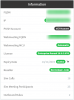
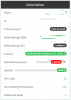
Hi this is my information.
12573
 
Hi Keng,

Are you using a custom FQDN and SSL certificate? Or is it a [yourname].3cx.com.my FQDN?

In the first case: Make sure the certificate is still valid, and then switch the PUSH account to 3CX and re-test. Does it work this way?

In the second case: due to an expired maintenance the FQDN has stopped working and the phones cannot reach the PBX so push is a secondary problem now - Just contact your partner to renew or switch to annual. You will also have the option to upgrade to V16 in this case and get the latest features, firmware and security patches.
 
  • Like
Reactions: apostolis_3CX
Hi i using [yourname].3cx.asia this FQDN.
 
Hi Keng,

Ok since the maintenance has expired, the FQDN probably stopped working and your certificates have also expired since February (like case 2 above). Also, important to note, our newest mobile app is no longer compatible with a V15.5 PBX because we made some changes to the way push works. It only works fully with the latest version on V16.

I would suggest to contact your reseller to have it sorted. If that is not an option (for any reason) you can unlink the reseller, and manage your own key from your customer portal https://customer.3cx.com

PS: Have you tried upgrading to V16 yet or did the update not appear for you?
 
Last edited:
Hi Keng,

JohnS_3CX has all valid points. Additionally you can also try to disable your phones battery saving policies on the 3CX app. This solved it for us on many occasions.

Cheers,
Tommie
 
  • Like
Reactions: Evolute IT
Status
Not open for further replies.

Members Online Now

No members online now.

Forum statistics

Threads
111,832
Messages
589,286
Members
164,662
Latest member
DejanMDS