3CX not working with Twilio SIP Trunk

wescravn

SMB User
Joined
Sep 16, 2025
Messages
11
Reaction score
1
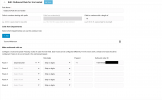
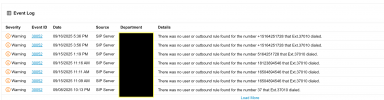
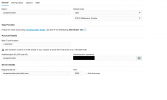
I setup my twilio sip trunk per this exact guide then create outbound rules and 3cx is not honoring any rules. I've tested both termination and origin sources and it is working correctly. View the images below
Screenshot 2025-09-20 at 11.53.32 AM.png

Screenshot 2025-09-20 at 11.53.32 AM.png
 

Attachments

  • Screenshot 2025-09-20 at 12.29.46 PM.png
    Screenshot 2025-09-20 at 12.29.46 PM.png
    275.6 KB · Views: 10
  • Screenshot 2025-09-20 at 12.29.27 PM.png
    Screenshot 2025-09-20 at 12.29.27 PM.png
    120.4 KB · Views: 9
  • Screenshot 2025-09-20 at 12.49.38 PM.png
    Screenshot 2025-09-20 at 12.49.38 PM.png
    219.6 KB · Views: 11
Extension 37010 is Porsha, who is placing the outbound call, but your outbound rule is restricted to Tyrone only. You'll need to include Porsha in the outbound rule or remove the restrictions altogether.
 
  • Like
Reactions: fxbastler
how can i remove the restriction?
 
  • Like
Reactions: IrinaP_3CX
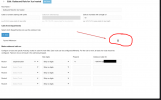
i keep removing this, saving it, and it keeps adding the department name back. Please help.
 
Try adding all departments to the rule, so it negates the restriction that way.
 
  • Like
Reactions: bitn2
There is only one department named Tyrone Williamson
 
or would you suggest i close the account and recreate it?
 
Those numbers, when dialed with the + are 12 digits, your rules cover 3, 10 & 11. You need a catch all rule at the end or one that handles 12 digits explicitly.
 
  • Like
Reactions: bitn2
Thats why those restriction are not good if you dont know what you are doing.

You can try this if you put a rule at top with no restrictions. If this works, you know where you have to change something.
 
I tried creating a 12-digit dial rule and nothing is working. This is really frustrating. So i was asking if i setup a brand new account would that work. Trying to troubleshoot this issue is not working and the delayed responses are not very helpful.
 
I tried creating a 12-digit dial rule and nothing is working. This is really frustrating. So i was asking if i setup a brand new account would that work. Trying to troubleshoot this issue is not working and the delayed responses are not very helpful.
Try what i said.
 
I can't create a rule at the top, it always lists the department in it.
 
that's ok, but do it without the other restrictions.
 
I created the 12 digit rule no luck
 

Attachments

  • Screenshot 2025-09-23 at 4.56.27 PM.png
    Screenshot 2025-09-23 at 4.56.27 PM.png
    114 KB · Views: 9
I give up.... Without this restrictions!
 
  • Like
Reactions: KyriacosS_3CX
The department will always be a part of the outbound rule as you are on SMB so it's a mandatory requirement. Remove the digit restriction from your outbound rules and try again.
 
  • Like
Reactions: bitn2
Ok Yiannish, I did your suggestion, and I get 3cx cannot reach the number, you called. The number may be incorrrect or unavailable. That's the same message I have been getting.
 

Attachments

  • Screenshot 2025-09-24 at 8.45.52 AM.png
    Screenshot 2025-09-24 at 8.45.52 AM.png
    94.6 KB · Views: 5
  • Screenshot 2025-09-24 at 8.46.20 AM.png
    Screenshot 2025-09-24 at 8.46.20 AM.png
    107.3 KB · Views: 5
  • Screenshot 2025-09-24 at 8.46.54 AM.png
    Screenshot 2025-09-24 at 8.46.54 AM.png
    67.8 KB · Views: 5
Last edited:
Now that you fixed your outbound rule make sure that you are dialing numbers using "+" as Twilio only accepts the E164 number format e.g. +12346678990
Try making a new call as the error you got was from 3 days ago.
 
  • Like
Reactions: paulodagraca

Members Online Now

No members online now.

Forum statistics

Threads
111,831
Messages
589,277
Members
164,660
Latest member
RJenkinsROCK