3CX on 3G/4G

Status
Not open for further replies.

SVanBC

Bronze Partner
Advanced Certified
Joined
Dec 14, 2017
Messages
54
Reaction score
1
Hi

As our customer keeps complaining about not receiving his phone calls on his iPhone, I start to wonder how reliable the 3CX client is on the 3G/4G network.

Apperently when our client moves off-site and connects to the 3G/4G network, his calls will not always connect to his iPhone and not receive any PUSH notification; although 3CX is allowed to use his mobile data on his iPhone.

Made a call to our license distributor and he told us that 3CX is not the product to offer as an off-site VOIP solution due to (possibly) bad 3G/4G coverage in the area. When I test the 3G network at the client side, I can browse and stream YouTube with no issues. But why is the 3CX only receiving PUSH notifications from time to time and not 24/7? Dynamic IP issue? Port issue? 3G/4G issue? :eek:

Not sure if anyone else has this specific issue; where he is using 3CX completly on his mobile device and whether or not he is missing some incoming calls? Is this normal behavior that not every call will connect to the iPhone?

If anyone has any experience with this, i'd love to hear it :)

Regards,

Sven
 
We have found most of the issues occur when driving. 3G/4G is great for streaming audio or video, where it can buffer a few seconds - but not so much for VoIP.

We counsel users to configure calls to Forward to Mobile when they are out, and if they are driving down the freeway to ignore the 3CX push notice and let the call roll to the cell. Not an option for all, but it helps.

The "twin" feature @mtech1 mentioned is the "Ring my mobile simultaneously" under the extension forwarding rules for some of the Status options. If the user does not/cannot use the app this can be useful, but if they have the 3CX mobile app it would not make sense to do both at the same time.

Thanks for explaining, accentlogic.

I noticed that this feature was enabled on both the iPhone extensions, although they do not have another location where the extension is loaded. Perhaps I should turn it off!
 
Hi @SVanBC ,
Finally I found the opportunity to share my experience. Yayyyyyy

I have came across the same issue and I managed to resolve it by increasing the ringing time on the extension from 20 secs default to 45-60 seconds and it resolved the issue.

Sometimes the 3G/4G network latency make influence on the push speed and it takes a few more seconds than a regular ring.

I hope this can help you.

Best luck.
 
  • Like
Reactions: Vali_3CX
Probably makes sense to compare with built-in native SIP client (found in most Android phones) or CSIPsimple application (from PlayStore). You can configure the same account as 3CX client on another application and make call to this extension to check whether 3CX and other application will ring simultaneously. 3CX client uses PUSH notification, while other application maintain active registration (keep alives) to 3CX server. Note comments above from Vali_3CX.
 
I wonder why it's not possible to include call-ID(unique, not CID) of SIP INVITE to custom payload?
It seems that Quickblox will send such payload for VoIP push. App will now know for sure that received push is for already answered call.

pushRegistry:didReceiveIncomingPushWithPayload:forType:withCompletionHandler:

At least try on another platform on which 85% of Android apps should work without modification!
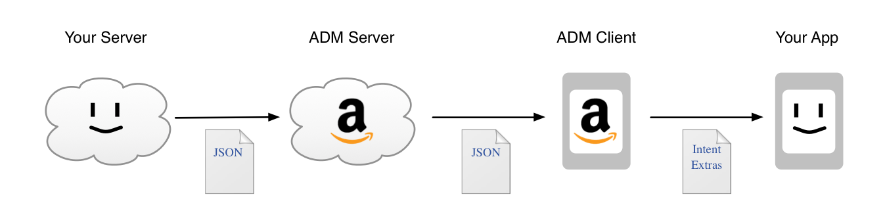
Create an account on the Amazon Apps & Games Developer Portal and add your app, if you have not already done so.
adm-understanding-diagram._TTH_.png

I'm not sure they allow that each 3CX server on customer location can send push.
Also, there might be a client-related reason which prevents the PBX to send push: device's network changing: client registers to the PBX as coming from WiFi; now, if client's device switch in the background to 3G or a different WiFi, for max 2 minutes (registration timeout) it will not receive push, since it still appear as registered on the PBX.
That time can be increased, but app instead should:

Re-Registration has been added to the core of Linphone to be robust to network changes (for example loss of network or wifi to 4G etc...) so you should be fine.

Always attempt to make a connection. Do not attempt to guess whether network service is available, and do not cache that determination.

  • By registering for network change notifications, your program is alerted when the available network interfaces change.
REGISTER SIP message on network change with 2 "Contact" header (TLS)
Portugal vs. Denmark
Code:
"data":
   {
   "from":"Sam",
   "message":"Hey, Max. How are you?",
   "time":"10/26/2017 04:10:00"
   }
So, either PBX has a reason to don't send it (for instance, device is registered)
Better approach would be that mobile client should be registered for 30 min. PBX should send push if mobile client is not responding to invite. Mobile client will re-register after 15 min and if that fails it will try every 1 min.
 
Last edited:
Status
Not open for further replies.

Latest Posts

Forum statistics

Threads
112,089
Messages
590,698
Members
165,057
Latest member
MichelvdEnde