


- Joined
- Nov 14, 2013
- Messages
- 8
- Reaction score
- 0
Hi Guys,
New to the 3CX system, and playing around with it.
What I am trying to reach:
3CX running on a VM on MS Azure platform
How far am I ?
Created the VM, setup the system, installed 3CX and apllied free licence.
Created the VoIP provider, registers fine
Created some extensions
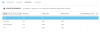
Then in Azure created the following endpoint settings:
5060 -> 5060
5061 -> 5061
5090 -> 5090 TCP and UPD
5000 -> 5000
Now the status is as followed; I can reach the admin web interface from an external IP. Yet, registering a external extension is not possible. Also every single firewall checker run gives me that port forwarding is not properly configured.
It probably has something to do with Azure tunneling the traffic, but I can not figure out where it goes wrong.
The external IP is 138.91.54.8 and the VM IP is 100.92.142.143.
Anyone has an idea what I am missing ?
PS Firewall is turned off
UPDATE
The ports do show up as open when testing with a external website...
http://www.yougetsignal.com/tools/open-ports/
Port 5060 is open on suppahost01.cloudapp.net.
Yet the soft phone will still not connect.
UPDATE 2"
Phone connects for a second, and then comes back with error 407...
No idea what to do anymore..
New to the 3CX system, and playing around with it.
What I am trying to reach:
3CX running on a VM on MS Azure platform
How far am I ?
Created the VM, setup the system, installed 3CX and apllied free licence.
Created the VoIP provider, registers fine
Created some extensions
Then in Azure created the following endpoint settings:
5060 -> 5060
5061 -> 5061
5090 -> 5090 TCP and UPD
5000 -> 5000
Now the status is as followed; I can reach the admin web interface from an external IP. Yet, registering a external extension is not possible. Also every single firewall checker run gives me that port forwarding is not properly configured.
It probably has something to do with Azure tunneling the traffic, but I can not figure out where it goes wrong.
The external IP is 138.91.54.8 and the VM IP is 100.92.142.143.
Anyone has an idea what I am missing ?
PS Firewall is turned off
UPDATE
The ports do show up as open when testing with a external website...
http://www.yougetsignal.com/tools/open-ports/
Port 5060 is open on suppahost01.cloudapp.net.
Yet the soft phone will still not connect.
UPDATE 2"
Phone connects for a second, and then comes back with error 407...
No idea what to do anymore..

 its very frustrating


