Solved 3cx on google cloud platform does not start up

Status
Not open for further replies.

ADX88

Free User
Joined
Feb 11, 2021
Messages
7
Reaction score
0
Last year I installed automatically 3cx on the Google Cloud Platform with the installer of 3cx.
Google suspended today the service because the year trail period ended.
I have upgraded to a paid account now.

I have restarted the virtual machine.
Now my 3cx doesn't come up and it is not online.

How can i get my 3cx environment back online? Anyone who can help me?
 
@ADX88 ssh to the machine and check if all services are started via command line.
If machine has an issue, you have and offsite backup in order to spin up a new one and restore your backup ?
You can do this via Marketplace in 10 min.
 

@NikosT_3CX

Hi Tnx for your reply, Which services i need to check?

I have a backup of my environment available.
 
Last edited:
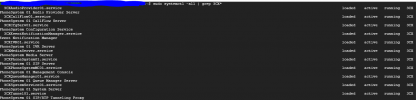
@ADX88 check " service 3CX* status " and also " service nginx status "
If you have issues and you cant bring them up, you may tshoot but to not waste time, spin up a new one from Marketplace, restore the backup and good to go.
 

NikosT_3CX link to marketplace?​


If you have issues and you cant bring them up, you may tshoot but to not waste time, spin up a new one from Marketplace, restore the backup and good to go.

Any steps how to do it?

Can you advice how to start up the 3cx service?
 
Last edited:
Hi @ADX88,

Please check " service 3CX* status " and also " service nginx status ".

If the current machine is not able to start the services continue to the below method:

As you mentioned in your previous messages you're using Google Could Platform. Find the Marketplace page in your platform and search for 3cxpbx.

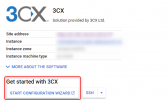
Once the virtual machine is launched, you will see the 'Start Configuration Wizard' button (see screenshot below)

1624651912991.png

If you have an offsite backup from your old machine, you can use it to restore from backup during the new deployment.
 
1624653756712.png

i have found that the services are running
 
Can you also confirm that nginx service is running by executing 'service nginx status' command?
If not, start it and check if you're able to access your instance via your FQDN.
 
We have found the issue..the public ip adress is changed by google after restart.
The url of my environment is not referring to the right public ip adress.

https://XXXX.my3cx.nl/#/login must refer to the right IP adress.
How can we fix this?
 
This is because you're using a Dynamic IP address. Please be noted that it can take up to 24 hours for DNS propagation to reach you. At the moment I would suggest using your new IP address to access your instance until your FQDN change its IP address.
 
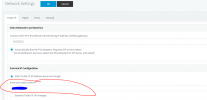
I logged in to my client(with the ip address) and then update my external IP adress.
See red box. Everything worked after that.

1624656193938.png
 
@ADX88, Google Cloud Platform virtual machines are relying on a Dynamic IP address. Ideally, you should never configure a static IP address. Otherwise, you will have to change it manually in case that the IP address changes again over time.

An alternative to your case will be to convert the Dynamic IP address to Static but, this will require more expenses as you need to pay for it!
 
Last edited:
Status
Not open for further replies.

Forum statistics

Threads
111,974
Messages
590,081
Members
164,899
Latest member
mazet