3CX out Office Hour External call Rule not working

Status
Not open for further replies.

E-Shopping.Akij

Customer
Joined
Jun 17, 2023
Messages
5
Reaction score
0
Dear Concern,

We have already blocked user’s outbound calls after office our (8.00 AM to 7.00 PM)

Now we need to allow some exceptional users to call outbound after office hours.

Please help us implement the rule urgently.


Akij Group, Bangladesh
 
Dear Concern,

We have already blocked user’s outbound calls after office our (8.00 AM to 7.00 PM)

Now we need to allow some exceptional users to call outbound after office hours.

Please help us implement the rule urgently.


Akij Group, Bangladesh
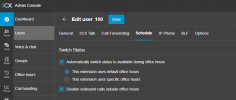
The setting is per user, so just disable it for the users that you need to be able to make outbound calls after hours.
 
The setting is per user, so just disable it for the users that you need to be able to make outbound calls after hours.
I can't find the option which needs to disable

Can you please help me find the option?
 
  • Like
Reactions: N_G
Thanks for your instruction

Lets see the result today after the default office hour.

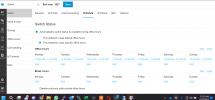
1687235179617.png
 
Not working the above setting

I think this setting is for Extension status changes to be available during office hours, not for outbound calls.

User office hours are not affected when global office hours are enabled.
 
Hello,
What setting did you use to " blocked user’s outbound calls after office"?
 
Hi @E-Shopping.Akij,

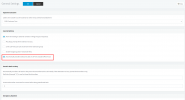
Since you have applied the restriction of the outbound calls on the user level, make sure that you disable the option(if enabled) " Automatically disable Outbound calls on all Ports outside Office hours"(Management Console >> Settings >> General).

In case the above option is enabled, it will override the configuration in regards to the outbound calls on the user level.
 
  • Like
Reactions: SweetAction
Hello,
What setting did you use to " blocked user’s outbound calls after office"?
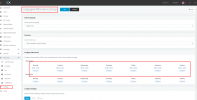
We are using the below Global office hours for the tenant from Management Console

1687323109085.png1687323147374.png

Thanks
 
Right, so you need to disable the block in general settings and only use the block in per user settings.
 
  • Like
Reactions: N_G
The Process
1. First you need to assign an user account as system owner, to activate admin functions.
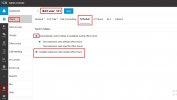
2. Then inside your webclient panel, as per attached screenshot, you can enable your feature of disabling outbound call outside office hour (User wise)
 

Attachments

  • Screenshot_94.jpg
    Screenshot_94.jpg
    72.5 KB · Views: 7
Status
Not open for further replies.

Forum statistics

Threads
112,326
Messages
591,900
Members
165,479
Latest member
Senergia