3CX outbound, caller ID name for multiple companies

jrowand001

Silver Partner
Basic Certified
Joined
Mar 12, 2021
Messages
4
Reaction score
0
Hello,
I’ve faced an issue a few times now where we have a 3CX instance for a company that runs more than one banners and want distinct caller ID for both the number and the name. I’ve seen multiple forums about adjusting the outbound, caller ID in the outbound route, which is fine if I’m only adjusting the number
The issue I am having, however, is that we need to be able to push out a different name as well. I know the limitations of different carriers already and here in Canada it is not an issue for most carriers. We can send out whatever we want as name. This has been a feature that is existed for years in nortel avaya mitel FreePBX emetrotel panasonic and others both for PRI and sip trunk . I’m wondering if anyone has succeeded in doing this in v20 . I already know about changing the outbound name field to custom, but that only allows me to send a single name.. so has anyone found another workaround ?
Thanks
 
I would talk to your carrier. Maybe they can associate a name with the DID and push the name for you? Alternatively, maybe you could have a separate trunk, or account for each business and specify the name on the account. Then use the prefix approach for selecting the correct trunk/account?
 
Hi MAtthew,
Thanks for the reply .
It's a good idea in theory but we happen to be their SIP trunk provider as well and we don't have the ability to do this on our switch and then the calls get pushed to upstream wholesale carriers and dont always use the same ones depending on the routes and i know there is no way they will do this for us.
Maybe creating multiple trunks might work but i'd have to test it out .

I'm hoping more this gets the attention of 3CX and they add the feature on future releases because like i said we've been able to do this from way back in the Nortel BCM era so it's a pretty basic feature they should think about adding .
Thanks again
 
Hi @jrowand001

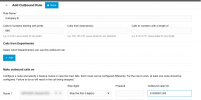
You could use a prepend to set a different outgoing rule and then force the DID.

It would look something like this....
When customer dials 666+Number, it would select the trunk, strip "666" and then send to the carrier with the Outbound Caller ID 61399991234

1732161248922.png


Hope this helps :)

Best
Lance
 
The issue is not what number is displayed to contacts, rather, it is the caller ID NAME they want to change.
 
On our side, we create one SIP Trunk per callername, and use prefixes or rules for departments to choose which Trunk to use.
 
Thanks Lance ,
The issue is not the number, i'm good with that part , it's really sending a different company name part that i can't achieve.
Thanks Phil , ill try the multiple trunk route and hopefully 3cx will add a name field in the outbound route in the future.

Thanks to everyone that replied.
 
I am facing this same issue too. Two companies. Before v20 I could change the Name of the outbound caller ID. Now with v20 only one company has the name and I don't know where in the admin options to change the name for the DID. Even in users I don't see change the name of outbound caller id name. Only the phone number. Please help. Before we could do this in the old version. I do not want to go through creating several trunks. Anyone has a solution. I have three DIDs that have three different names/companies. I don't mind deleting the name of the outbound caller id but even that I cannot find in v20. 3cx support please help us. Thanks.
 
I am facing this same issue too. Two companies. Before v20 I could change the Name of the outbound caller ID. Now with v20 only one company has the name and I don't know where in the admin options to change the name for the DID. Even in users I don't see change the name of outbound caller id name. Only the phone number. Please help. Before we could do this in the old version. I do not want to go through creating several trunks. Anyone has a solution. I have three DIDs that have three different names/companies. I don't mind deleting the name of the outbound caller id but even that I cannot find in v20. 3cx support please help us. Thanks.
Go in voice and chat , click on your trunk , then Options , click on caller id control and under From: Display name , change to custom and enter the name you want .. only downfall is like i posted above, only one name for everything on that trunk .
 
A lot of providers offer sub-accounts, which would allow you to create another trunk with different parameters. That's about the only way you will achieve this.
 
  • Like
Reactions: jrowand001
Thank you jrowand001 and leejor for the suggestions. I was able to find a solution. I think the callerid name is taken from the CNAM where I have my DID. I am waiting for approval and see if that works. I like the way 3CX works now without having to create multiple trunks for each line. I use SMS and MMS so I don't want to mess things up.
 

Forum statistics

Threads
111,958
Messages
589,934
Members
164,861
Latest member
LewisJC