3cx PBX blocking our VoIP provider sip requests

onlineaccess

Customer
Joined
Feb 19, 2020
Messages
15
Reaction score
0
I manage 2 different PBX boxes hosted by 3cx. They are both running Version 20.0 Update 7 (Build 1080 Release).
Both are using the same VoIP provider (VoIP innovations) with the same VI server IP UDP port 5060. And both servers are set up the same on the Voip providers end (except for the recent FQDN change i mention later).

The trunks are set up as Generic SIP Trunk (IP Based) and the port on 3cx is set to 5060.

At the start of this issue both were using the same exact settings other then the 3cx server IP and the phone numbers.

One is working fine receiving calls and such.
The other stopped accepting requests from our VoIP provider. 3cx is not responding to the VoIP providers SIP Invites thus calls are failing to reach our server.
(Oddly direct lines are able to make it through on our VoIP providers Tertiary Inbound IP)

Since the issue, I have even gone and swapped pointing our endpoint from the servers IP to point at our servers FQDN with the IP being the backup.
I have gone through and set all of our VoIP providers IPs as allow in the IP blacklist in the admin console.

The server with the incoming issue is also unable to outbound calls through our VoIP provider.


The only warnings the event log shows is:
Unidentified Incoming Call. Review INVITE and adjust source identification:
%1.
WarningThis is a problem when the Source is not trusted.
3CX expects SIP call traffic to come from a certain IP Address and with a certain format and fails to satisfy 3CX checks. For security purposes 3CX will not allow this request and show this message.
Call or Registration to %1 has failed. %2 replied: %3WarningCheck the reply from the endpoint.


My only theory is that 3cx has a firewall that I am unable to control and they have blacklisted my providers IP addresses, except for the Tertiary Inbound IP.
 
Last edited:
Is the ip of the PBX whitelisted from your provider as well?
 
Check the Blacklist in Advanced -> IP Blacklist. If you see a DENY for an IP assoicatied with your SIP provider, be sure to deleted it, then add the allow rule for the IP or subnet. Changing it to allow when it was auto blocked does not work.
 
Check the Blacklist in Advanced -> IP Blacklist. If you see a DENY for an IP assoicatied with your SIP provider, be sure to deleted it, then add the allow rule for the IP or subnet. Changing it to allow when it was auto blocked does not work.
Yeah I have whitelisted all the IPs that deal with voip innovations in the IP blacklist. There are 4 for inbound and only one works but it is the last one, for some reason only the direct lines get through on that, probably because i dont have a failover set to the main numbers not the direct numbers.

And I manually entered all of them to be allowed, and the IP never was on the block list,

This is why I think there is another blacklisted controlled by 3cx since it is a server hosted by them.
 
Last edited:
Is the ip of the PBX whitelisted from your provider as well?
I dont think there is a whitelist i can access with Voip innovations, but they are also the ones who did the trace route and showed that our 3cx server wasnt responding to their requests, so I would assume they would of of done that themselves while helping me. I will ask them though but leaning towards that not being the issue as my other server is working just fine and I can't think of a reason the bad server would get blacklisted.

Also they work with endpoints so I have put both the server IP and the FQDN name in the endpoint and that would be insane if their system blacklists Ip tied to endpoints. But will still ask.
 
You mentioned that they claim that the PBX does not respond. This has to be checked with captures and logs to identify if those does reach the NIC of the PBX server.
 
You mentioned that they claim that the PBX does not respond. This has to be checked with captures and logs to identify if those does reach the NIC of the PBX server.
Well Voip Innovations showed me the results of them calling into our number and if they are lieing about that then troubleshooting as a whole is pointless.

VOIP Innovations:
"Furthermore, when I conduct a test call to DID ##### I am able to replicate this issue. During my test, I ran a SIP trace and see that we tried to send an INVITE packet from our Primary Inbound IP ****Voip**** and did not get any response from your IP ***3cxbox***. After three attempts, our system will send a Cancel packet. See the example from my SIP trace below:

107971 8.710363193 ***voip**** ’ ***3cxbox*** SIP/SDP 1019 Request: INVITE sip:#####@***3cxbox***:5060 |
120777 9.714920329 ***voip**** ’ ***3cxbox*** SIP/SDP 1019 Request: INVITE sip:#####@***3cxbox***:5060 |
127324 10.213345559 ***voip**** ’ ***3cxbox*** SIP/SDP 1019 Request: INVITE sip:#####@***3cxbox***:5060 |
139601 11.214011956 ***voip**** ’***3cxbox*** SIP 398 Request: CANCEL sip:#####@***3cxbox***:5060 |

I would like to note that when we send calls from our Tertiary Inbound IP, ****VOIPbackup****", I am seeing normal call completion as it appears your IP is accepting our INVITEs from that IP

And there is no entries of calls making it to our 3cx box in the report or logs. Their is a random warning that I get when I try to add a new trunk with a new number from Voip Inno as i showed in the main post. but nothing for our main number or for any calls. Once again the settings are the exact same on our other 3cx box (other then the server IP and the main Number) and that box is working fine.
 
I dont think there is a whitelist i can access with Voip innovations, but they are also the ones who did the trace route and showed that our 3cx server wasnt responding to their requests, so I would assume they would of of done that themselves while helping me. I will ask them though but leaning towards that not being the issue as my other server is working just fine and I can't think of a reason the bad server would get blacklisted.

Also they work with endpoints so I have put both the server IP and the FQDN name in the endpoint and that would be insane if their system blacklists Ip tied to endpoints. But will still ask.
yes the IP is whitelisted by our provider voip innovations
 
I would like to note that when we send calls from our Tertiary Inbound IP, ****VOIPbackup****", I am seeing normal call completion as it appears your IP is accepting our INVITEs from that IP
This sounds like your pbx is sending the call to one ip from your provider and they answer from a different.. This could end in such problems.
 
This sounds like your pbx is sending the call to one ip from your provider and they answer from a different.. This could end in such problems.
I am confused by what your saying.
PBX being the 3cx server. Provider being SIP trunk, voip innovations. (if I have the terms wrong let me know, thx)

So VOIP Inno sends calls to our 3cx server IP. Currently I have failover set up on our number, if their main inbound IP fails to reach us it is forwarded to the failover which i have set up at twilio.
If I dont have a fail over set up the number will go through their list of inbound IPs, for some reason the only IP that gets through is their tertiary IP (logs show its actually their quaternary IP, so typo). But in doing this the customer is on the line for a minute before any ringing happens, as each IP is tested.

(I have even tried setting up a trunk for each inbound, I have reverted back to the same setup as on the other working server since that didnt work.)
Public doc of Innovations IPs:
https://sangomakb.atlassian.net/wik...ale+SIP+Trunking+-+SIP+Signaling+IP+Addresses

The trunk is set to their Primary Inbound IP, so I dont know what different IP the 3cx PBX is expecting and the end point is set to our 3cx server IP so that should be the only IP replying to VOIP.

Please let me know if I got anything wrong on how voip systems work as I'm learning on the go with this.
 
I manage 2 different PBX boxes hosted by 3cx. They are both running Version 20.0 Update 7 (Build 1080 Release).
Both are using the same VoIP provider (VoIP innovations) with the same VI server IP UDP port 5060. And both servers are set up the same on the Voip providers end (except for the recent FQDN change i mention later).

The trunks are set up as Generic SIP Trunk (IP Based) and the port on 3cx is set to 5060.

At the start of this issue both were using the same exact settings other then the 3cx server IP and the phone numbers.

One is working fine receiving calls and such.
The other stopped accepting requests from our VoIP provider. 3cx is not responding to the VoIP providers SIP Invites thus calls are failing to reach our server.
(Oddly direct lines are able to make it through on our VoIP providers Tertiary Inbound IP)

Since the issue, I have even gone and swapped pointing our endpoint from the servers IP to point at our servers FQDN with the IP being the backup.
I have gone through and set all of our VoIP providers IPs as allow in the IP blacklist in the admin console.

The server with the incoming issue is also unable to outbound calls through our VoIP provider.


The only warnings the event log shows is:
Unidentified Incoming Call. Review INVITE and adjust source identification:
%1.
WarningThis is a problem when the Source is not trusted.
3CX expects SIP call traffic to come from a certain IP Address and with a certain format and fails to satisfy 3CX checks. For security purposes 3CX will not allow this request and show this message.
Call or Registration to %1 has failed. %2 replied: %3WarningCheck the reply from the endpoint.


My only theory is that 3cx has a firewall that I am unable to control and they have blacklisted my providers IP addresses, except for the Tertiary Inbound IP.
Also our outbound calls fail to go to VOIP Innovations and end up using our backup trunk twilio.

We cant easily port our numbers to twilio due to how twilio handles the texting and voice side of a number since another account is using our main numbers texting side.
 
The info in this thread and the docs seem to indicate that:
  • you need an inbound-only trunk for each of the inbound IP Addresses
  • you need an outbound-only trunk for the outbound IP Address you plan to use for outgoing calls
It seems likely that the inbound trunks might need some fiddling. The VoIP Checker can help narrow things down - in a few days V20u8 will be final, by the way...
 
The info in this thread and the docs seem to indicate that:
  • you need an inbound-only trunk for each of the inbound IP Addresses
  • you need an outbound-only trunk for the outbound IP Address you plan to use for outgoing calls
It seems likely that the inbound trunks might need some fiddling. The VoIP Checker can help narrow things down - in a few days V20u8 will be final, by the way...
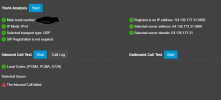
Hi, I have updated and tried the trunk Checker.
1771257252668.png
Call log: Starts waiting for call at Trunk 10001

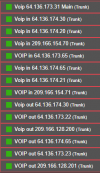
The calls are still failing and I have created a trunk for all incoming and outgoing IP Voip innovation uses.
1771257355120.png

I control another companies 3cx and they also use VOIP innovations and on theirs I have only the 64.136.173.31 trunk set up and they are running into no issue. I have even matched the entry to the working one except for the Server IP on voips end and the main trunk number is different.

I am at a loss of what could be wrong?
Also tried the checker on the working server, same result inbound showed as failed, so did the test on a twilio trunk we are using, so I think the inbound call test feature doesn't work in general.
 
Last edited:

Forum statistics

Threads
112,283
Messages
591,698
Members
165,406
Latest member
ARKC