3CX PBX Failvoer Active Passive internal dns resolution

Alle CTEC

Silver Partner
Advanced Certified
Joined
Sep 11, 2023
Messages
360
Reaction score
45
3CX_Failover.drawio.png


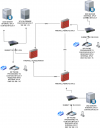
Hi everyone, I'm attaching a diagram of a hypothetical situation involving a customer with multiple locations all connected via VPN to a primary 3CX. Let's say I want to install a 3CX in failover mode at location 2. All devices connect via FQDN. The two switchboards will obviously have different LAN and public IP addresses. It's clear to me that the scripts update the external DNS with the external public IP address. But how do all the devices that connect internally and therefore use the internal DNS receive the IP change? Thanks.
 
Hi,

You will need to modify the provided fail-over scripts (https://www.3cx.com/docs/failover/#h.x7ootglq7juf) to include an update to your internal DNS servers to reflect the change.

Still with a split location failover you should also consider split brain scenarios where the two sites loose their interconnection and both try to be primary at once - the secondary will take the FQDN, and if it's isolated will knock the primary + 3rd office offline.

Although doing failover in general is good, the failover servers might best be in the same LAN - and to have operational resiliency of the different branches have separate instances in each branch, connected together via bridges.
 
Sorry, but even if the PBXs are on the same network, for example 192.168.1.20 Master 192.168.1.21 Slave, if the slave starts working internally, the FQDN of the switch must be resolved with 192.168.1.21, so the DNS that manages the 3CX split DNS must receive the change from 20 to 21, otherwise all the internal devices will not work because they point to the master's IP address. Furthermore, if I insert the failover scenario in the same LAN and for some reason the main office goes down, the failover also goes down.
 
The exact DNS magic needed depends on whether you are doing split DNS or hairpin routing etc. No matter where the failover scenario happens some DNS updating will be needed, that is without question.

Now on whether it's best to have failover in one location or multiple, you need to balance probability of failure modes. If you have the ability to lab test it it might give you a better idea of how each part will behave.

If the customer truly cares about resilience, I would heavily suggest using 3 separate PBX licences, one per location, bridged between each other, and then choose whether this PBXs need a local or remote failover.
 
The scenario is actually broader, we're talking about 7 locations including the main one, which are currently already connected via VPN with connectivity and related backups. So each location has the split DNS zone on its own DNS servers that points to the IP address of the 3CX active at the main location. All devices—IP phones, 3CX apps, 2N intercoms, Patton FXS, Gigaset DECT—are provisioned and connected via FQDN. Since we have a virtualization system at the main location that migrates the machines to other nodes in the event of a failed node, I have little use for a failover on the same LAN. We wanted to add a failover at one of the 6 remote locations that would kick in if the main location goes down. So in addition to the external DNS, I need to update 6 DNS zones located on Microsoft DNS. I should point out that all the locations are connected to each other directly, not via a hub, so if the main location goes down, communication between the other locations remains active. Having a single 3cx with multiple departments introduced by V20 has been a huge benefit
 
Hosting in the cloud would make failover simpler, if no location requires the PBX to be on premise. As a thought. It's a complex scenario so any solution will have pros and cons.
 
However, the 3cx guide doesn't mention anything about changing the internal split dns zone or did I miss something?
 
Excuse me, so in the case of failover it is recommended to migrate to a hairpin routing solution. This way there are no split DNS and you only use an external FQDN which is updated by the standard scripts?
 
Hello everyone, with a full DNS split on a Microsoft server, the 3CX must launch a similar script via the OpenSh service, access via a key, for example on the domain controller, which updates the split zone DNS record.

C#:
param(
    [Parameter(Mandatory=$true)][string]$RecordFqdn,      # es. pippo.my3cx.it
    [Parameter(Mandatory=$true)][string]$NewIP,           # es. 192.168.2.150 (failover) o 192.168.1.150 (primario)
    [string[]]$DnsServers = @(
        "dns-sede1.mydomain.local",
        "dns-sede2.mydomain.local",
        "dns-sede3.mydomain.local",
        "dns-sede4.mydomain.local",
        "dns-sede5.mydomain.local",
        "dns-sede6.mydomain.local"
    ),
    [timespan]$Ttl = ([timespan]::FromMinutes(1)),
    [string]$LogPath = "C:\Scripts\logs\Update-3CX-SplitDNS.log"
)

function Write-Log { param([string]$msg)
    $stamp = (Get-Date).ToString("yyyy-MM-dd HH:mm:ss")
    "$stamp $msg" | Out-File -FilePath $LogPath -Append -Encoding UTF8
}

# parsing zona/nome
if ($RecordFqdn -notmatch '^[^.]+\..+$') { throw "RecordFqdn non valido: $RecordFqdn" }
$parts = $RecordFqdn.Split('.',2)
$RecordName = $parts[0]
$ZoneName   = $parts[1]

Write-Log "=== Start update: $RecordFqdn -> $NewIP ==="
foreach ($server in $DnsServers) {
    try {
        Write-Log "[$server] Rimozione A esistente per $RecordName.$ZoneName"
        Remove-DnsServerResourceRecord -ComputerName $server -ZoneName $ZoneName -RRType "A" -Name $RecordName -Force -ErrorAction SilentlyContinue

        Write-Log "[$server] Creazione A ($NewIP) TTL $($Ttl.TotalSeconds)s"
        Add-DnsServerResourceRecordA -ComputerName $server -ZoneName $ZoneName -Name $RecordName -IPv4Address $NewIP -TimeToLive $Ttl

        # verifica
        Start-Sleep -Milliseconds 300
        $resp = Resolve-DnsName -Server $server -Name $RecordFqdn -Type A -ErrorAction Stop
        $ips = ($resp | Where-Object {$_.Type -eq 'A'}).IPAddress -join ','
        Write-Log "[$server] Verifica OK: $RecordFqdn = $ips"
    }
    catch {
        Write-Log "[$server] ERRORE: $($_.Exception.Message)"
    }
}
Write-Log "=== Fine update ==="

I'm evaluating using an SBC at each location, including the main one and the failover one, for communication with the 3CX master or failover. At the main and failover locations, I'm using a Hairpin NAT split DNS zone for internal communication, so as to use a single FQDN that resolves internally and externally with the public IP addresses of the two 3CXs, and a single 5090 tunnel port for the SBC and APP. The configuration is simpler and more efficient.
 

Forum statistics

Threads
111,956
Messages
589,927
Members
164,858
Latest member
MichaelRussell3