


- Joined
- Aug 22, 2024
- Messages
- 5
- Reaction score
- 0
Hi all.
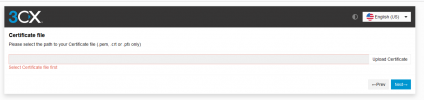
With 3CX v20, once I upload the confiuration file (from the system registration), the next screen popping up states:
Please select the path to your Certificate file (.pem, .crt or .pfx only).
I'll be using 3CX and haven't even started the process in Linux to generate a certificate file.
It also is something new compared to post Step 4 on the installation manual.
Any ideas on how I can get around it?
With 3CX v20, once I upload the confiuration file (from the system registration), the next screen popping up states:
Please select the path to your Certificate file (.pem, .crt or .pfx only).
I'll be using 3CX and haven't even started the process in Linux to generate a certificate file.
It also is something new compared to post Step 4 on the installation manual.
Any ideas on how I can get around it?


