3CX PWA with Pipedrive

Zakitc

Gold Partner
Advanced Certified
Joined
Sep 30, 2025
Messages
3
Reaction score
0
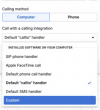
Need to link 3CX PWA with Pipedrive on MacOS Sequioa. I know there is no Apple desktop app from 3CX V20. But, as I understand - if Google Chrome is used instead with 3CX PWA and 3CX click2call extension - it should work. But it isn't - I installed 3CX PWA and 3CX call2link, setup call2link with corresponding 3CX URL (no other settings were available) But when Pipedrive is used from Google Chrome it will still automatically use Facetime for calls. Pipedrive doesn't allow any settings for calls related to Google Chrome or 3CX. Only:
SIP phone handler
Apple Facetime call
Default phone call handler
Default callto handler - which is setup by default
Default SMS handler
Custom - when used - both settings are "Custom"

Any advice please?
 
Need to link 3CX PWA with Pipedrive on MacOS Sequioa. I know there is no Apple desktop app from 3CX V20. But, as I understand - if Google Chrome is used instead with 3CX PWA and 3CX click2call extension - it should work. But it isn't - I installed 3CX PWA and 3CX call2link, setup call2link with corresponding 3CX URL (no other settings were available) But when Pipedrive is used from Google Chrome it will still automatically use Facetime for calls. Pipedrive doesn't allow any settings for calls related to Google Chrome or 3CX. Only:
SIP phone handler
Apple Facetime call
Default phone call handler
Default callto handler - which is setup by default
Default SMS handler
Custom - when used - both settings are "Custom"

Any advice please?
Set it to "default phonecall handler"
 
  • Like
Reactions: N_G
Thank you, but there is no option within Mac to change default phone call handler to anything else as Facetime. Not within Pipedrive or Google Chrome. That was the first thing I looked into.
 
Thank you, but there is no option within Mac to change default phone call handler to anything else as Facetime. Not within Pipedrive or Google Chrome. That was the first thing I looked into.
In Pipedrive in your profile IIRC. Mac/Windows doesn't matter, it's the config to tell Pipedrive how to format numbers URLs.
 
Thank you, I did find this option within Pipedrive, but none of the options allowed me to change anything. I tried Custom, but everything I was trying to put in was deemed as incorrect information. Default phone call handler didn't offer anyting, Default "callto" handler did asked for URL but when 3CX information was put in - again come back as incorrect information. Seems that it may work with desktop app, but there isn't desktop 3CX app for Mac's
 

Attachments

  • Pipedrive tra la la.png
    Pipedrive tra la la.png
    59.4 KB · Views: 4
Thank you, I did find this option within Pipedrive, but none of the options allowed me to change anything. I tried Custom, but everything I was trying to put in was deemed as incorrect information. Default phone call handler didn't offer anyting, Default "callto" handler did asked for URL but when 3CX information was put in - again come back as incorrect information. Seems that it may work with desktop app, but there isn't desktop 3CX app for Mac's
You misunderstood. By setting it to "Default PhoneCall Handler", Pipedrive will present phone numbers as "tel:" links. That's it. No customization there.

Then, the 3CX Click2Call extension can hook on them to trigger the Webclient. There's no other setting needed.
 

Forum statistics

Threads
112,011
Messages
590,285
Members
164,954
Latest member
UHA