3cx route calls by department

tkg

Silver Partner
Advanced Certified
Joined
Nov 30, 2023
Messages
7
Reaction score
0
Is there any way to tell the system that if a user misses a call between a certain set of hours AND they are in a specific department, route the missed call to a specified extension?

For example

If a user in the department "ON CALL" misses a call between the hours of 8pm and 6am, route to a different person?

Call queues cant really be used as our client does not want to rely on the on call person to take themselves in and out of queues. Unless there is a way force users in and out of queues based on a specified schedule.
 
Without taking into account the requirements over time (maybe with call forwarding exceptions): using a call group with Prioritized Hunt instead is not an option?
 
Call group with prioritized hunt would be good if I didn't have to define users and could just do the department, its going to be a different on call person every night and I wouldn't want it to go through everyone whos not on call. (they already need to manually swap people out of the department each day for visibility reasons so their clients can determine who is on call) having them swap the department AND the call group was one too many steps for them.

Part of this is the people who will be looking at who is on call will be using the web interface and only want to see the person who is on call. They will call them directly if they dont answer to the chat and if they dont answer that then it needs to roll over to one specific person. Its hard because I only want that number to roll over IF they are in the 'on call' department during those hours.

Forwarding exceptions would be awesome if it could be told to only activate on missed calls instead of triggering on all calls. It only seems to let you choose a trigger of "Received during" instead of "Missed during". Even still I'm not sure I would want that always active because it would still trigger when they are not on call if someone is trying to reach them during those odd hours.
 
I didn't know about the many different and changing users, that wasn't what was asked.

The use of exceptions was intended to set up an exception for a specific time for this user for all calls (except for the specific call group), the call is routed to a call group with Prioritized Hunt, where this user is again a member in first place, it calls him and then the call is forwarded, e.g. to another user (or a dummy user with immediate forwarding to e.g. a queue or call group).

What you have in mind, especially with many and changing users and departments, cannot be implemented in 3CX with on-board resources. That always requires manual adjustments.

A call script can possibly cover that. To do that, you had to describe your intended call plan in a little more detail.
 
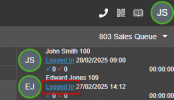
You can add the various on call agents into a queue and have a queue manager just log them in or out as needed, if the agents cant do it themselves.

As the queue manager, John Smith can log Edward Jones in and out of the queue as needed.

1740728599497.png
 
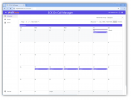
I encourage you to take a look at our 3CX On Call Manager. It handles all the pain points you have mentioned. It's pathetically simple to create recurring schedules using our web-based calendar. You can assign different schedules for different departments, and we support live-answer as well as voicemail. We include escalation up to 30 levels, with multiple people in each level. We send reminders to people who are scheduled to be on-call -- nice if you forget because you are only on call every 3rd week for example. We send notifications by phone, email and native SMS.

1740787920195.png
It may see like a given that everything is logged -- when the call came in, who was notified and how, whether escalation was necessary, and who ultimately answered the call. Agents can add notes to the log to explain the purpose of the call and what actions were taken. Logging can save your bacon when there are concerns about meeting SLA requirements, or disputes arise when an agent regularly allows a call to escalate rather than answer the call.

For those people following the link above, I just realized our website still has the old screen captures. Dang it! We just released an entirely updated UI (very pretty). So many enhancements all the time!
 
Last edited:

Latest Posts

Forum statistics

Threads
111,964
Messages
590,000
Members
164,869
Latest member
hpgitsupport