3CX SBC EOL: Upgrade Now for Improved Performance and Security

MichaelB_3CX

3CX Team
Staff member
3CX Support
Joined
Aug 25, 2009
Messages
568
Reaction score
699

Ensure security and performance with the latest 3CX SBC upgrade.​

The 3CX SBC build 18.1.36 for Windows and Linux, released in 2022 along with all SBCs running on Debian 9 or Debian 10, will reach End-of-Life (EOL) on 31st December 2024. After this date, 3CX will no longer support or update these versions.

Why Are The...

Continue reading the Original Blog Post.

 
From the 3CX site, they only mention 3CX SBC on a Pi5 in the installation guide.
Are the Pi3 and or 4 still supported with an upgraded V20 image, or do they need replacement?
 
So if you have Pi3B, 4 and 5 you can go choose the image you want to build. We do not enforce you to replace..

See here; https://www.raspberrypi.com/software/operating-systems/

To summarize;
if you are planning to install image bookworm for armhf (32bit) you can install to any pi - models.
if you want image bookworm for arm64 (64bit) is supported only from (3B onward+)
 
Last edited:
How do we know what build the SBC is on ? Ver20 doesn't show it anymore, where Ver18 did show the SBC build number
 
Open the properties of the SBC in "Voice and Chat", and there it is, below
 
What About the link with 3CX server ? does still be good ? or the connector will be down ?
 
Open the properties of the SBC in "Voice and Chat", and there it is, below
This is helpful, but when a system has dozens of SBC devices it's hard to audit and see which units still need an upgrade. Adding the version number to the list view would be very helpful. Even if it is only appended to the Information column.

I posted an idea on this some time ago. Please vote up if you think it would be useful.
 
What About the link with 3CX server ? does still be good ? or the connector will be down ?
Of course, during the update there will be no connection, so it has to be performed out of the working hours.
 
  • Like
Reactions: GregG_3CX
To be clear is it anticipated older SBCs will stop working at some point? (I would think so, but, any idea when?)

We have a handful of smaller clients using Pis, but the effort/cost to update the Pis is probably better spent switching to a router phone or SBC VM. Just looking for what to tell them to manage expectations, thanks.
 
They will become unsupported but will be working just fine.
 
OK thank you.
 
Hi How do we upgrade the SBC in a Fanvil X210-V2 router phone?
 
Hi How do we upgrade the SBC in a Fanvil X210-V2 router phone?
First sentence on the blog my guy, phones will get FW updates.

The 3CX SBC build 18.1.36 for Windows and Linux, released in 2022 along with all SBCs running on Debian 9 or Debian 10, will reach End-of-Life (EOL) on 31st December 2024. After this date, 3CX will no longer support or update these versions.
 
I am ashamed to say in a public place that I am still running Stretch at a few locations. I am getting this error when trying to use the provided commands/script
"message": "The upgrade script does not support armhf."

Anyone else having this issue?
 
  • Like
Reactions: N_G and Evolute IT
: "The upgrade script does not support armhf."
Are you trying to run it on a Pi? If so you need to image/create a new card per the blog post.

Otherwise it may be easier to just install a new one with the same IP.
 
  • Like
Reactions: accentlogic
Are you trying to run it on a Pi? If so you need to image/create a new card per the blog post.

Otherwise it may be easier to just install a new one with the same IP.
Ohhh you are so right. I totally missed that piece.

Thank you for sending me back to read the whole post.
 
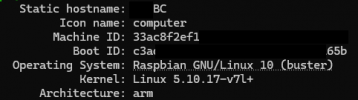
And to be clear, Pi SBCs require the full delete and reinstall with new image or can we run the Linux update script in the blog post?

My Pi

1735078941666.png
 
And to be clear, Pi SBCs require the full delete and reinstall with new image or can we run the Linux update script in the blog post?

My Pi

View attachment 45781
“The migration process depends on your current SBC setup:

Upgrading Raspberry Pi 3 or 4​

  1. Download the latest Raspberry Pi OS Lite image for Debian 12 (arm64 or armhf).
  2. Flush the SD card and install the new image.
  3. Follow the guide to install the latest SBC.”
 
  • Like
Reactions: N_G
Ugh... thanks for the braindead response.

But
I think I understand what you're trying to say.

I went back and re-read the post. Formatting wasn't ideal but I figured it out.
 
I was being quick, sorry if it came out wrong. But yeah it’s a manual upgrade, or write a card and ship it. Or set up a VM, or use router phones.
 
  • Like
Reactions: jed and N_G

Latest Posts

Forum statistics

Threads
111,990
Messages
590,164
Members
164,927
Latest member
tohoken1