3CX SBC Installation Error: FQDN Is Required.

Status
Not open for further replies.

Frank86

Bronze Partner
Joined
Jan 18, 2018
Messages
300
Reaction score
26
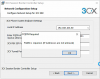
Trying to install the 3CX SBC on a Windows 10 PC. When I enter the FQDN of the 3CX PBX in the format https://acme.3cx.us:5001
I get the attached pop-up error, "FQDN is required. (IP addresses are not allowed).
What am I doing wrong?
 

Attachments

  • 3CX SBC Error.png
    3CX SBC Error.png
    52.9 KB · Views: 13
Don't enter the port in that field? Aren't there port fields right underneath that one?
 
I tried that, too, but it still didn't work.
 
and the https ?
have you tried removing that?
fqdn is a name only.
 
I've tried acme.3cx.us:5001 with no success.

What I've not tried is acme.3cx.us

I'll try that.

I've configured two 3CX SBCs on Windows in the past, but I don't recall how I entered the FQDN.
 
i've tried to reach your fqdn from France, didn't resolve.

try to set Public IP instead of FQDN
 
i've tried to reach your fqdn from France, didn't resolve.

try to set Public IP instead of FQDN

I assume ACME is not a real FQDN. It's been used in Cartoons for years as a fictitious company.
 
  • Love
  • Haha
Reactions: JohnS_3CX and AWS2P
Correct. Real FQDN is PureAwesome.3CX.us ;-)

Kidding.
 
So sorry , i'm french :oops:
 
  • Like
Reactions: craigreilly
  • Like
Reactions: AWS2P
  • Like
Reactions: AWS2P
Bravo , Craig et Frank.
Merci pour votre sens de l'humour !
beep beep and coyote is one of my favorites cartoons. so stupid Coyote like me with FQDN ;)
 
  • Like
Reactions: craigreilly
Status
Not open for further replies.

Forum statistics

Threads
111,928
Messages
589,778
Members
164,800
Latest member
JensVoss