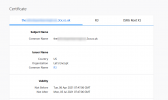
3CX security certificate is not renewing.

Status
Not open for further replies.

gregsmith0

Premier Customer
Joined
Dec 7, 2018
Messages
28
Reaction score
7
I have had a 3CX instance setup using the express method using Google Cloud for a couple of years now but we are having an issue where the certificate is not automatically updating.
I have attached a screen shot of the error message and expired certificate. I am completely baffled. any suggestions welcome.
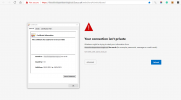
 

Attachments

  • Screenshot 2021-04-06 093259.png
    Screenshot 2021-04-06 093259.png
    51.3 KB · Views: 14
Hi @gregsmith0

Try clearing your browser cache or try a different browser as sometimes browsers report false information. Let us know of the results. If that does not work check if you got an email for a failed renewal attempt
 
Sorry, I should have been more clear. This is happening on all browsers from multiple machines across the company. We are not getting emails telling us that our certificate has failed to renew but this is clearly the problem. We have resorted to applying our own certificate manually. but it would obviously be better if we could get the auto renewal of our certificates working again.
 
The reason i suggested to clear your browser is because i can now see that the certificate is working fine if this is indeed your FQDN.
1617700271539.png What did you do exactly to manually fix it? I am asking because this might affect the next renewal process. Obviously now we cannot tell what went wrong and we will have to wait until the next renewal to troubleshoot, assuming it fails again.

Please note that in the previous days Let's Encrypt had an outage that might have affected the renewal. In case the PBX fails to renew the certificate it will try again the next day.
 
Status
Not open for further replies.