3cx setup and branches

Status
Not open for further replies.

Networkbug

Customer
Basic Certified
Joined
Jun 10, 2022
Messages
28
Reaction score
4
Hello there,

I am new to 3CX and so far loving the features it has to offer!.

I am in a phase to upgrade the telephone system with VOIP. 3cx was much better than other competitors.

The problem with opening ports to allow traffic in/out is worrying factor as i have read of security issues but generally, on forum many people have said they haven't faced any issues in terms of hacking.

Does having an SBC in each branch would be better option than VPN lan to lan?

I have 7 branches in total. one SBC in each branch?

Can anyone share if they configured 3cx on many branches and what setup they choose to install? plus best security method to avoid getting compromised.

Thanks.
 
Hello there,

I am new to 3CX and so far loving the features it has to offer!.

I am in a phase to upgrade the telephone system with VOIP. 3cx was much better than other competitors.

The problem with opening ports to allow traffic in/out is worrying factor as i have read of security issues but generally, on forum many people have said they haven't faced any issues in terms of hacking.

Does having an SBC in each branch would be better option than VPN lan to lan?

I have 7 branches in total. one SBC in each branch?

Can anyone share if they configured 3cx on many branches and what setup they choose to install? plus best security method to avoid getting compromised.

Thanks.
You will also want to secure the Antihacking settings and use the strong passwords 3CX generates by default. I suggest using M365 or Google SSO to allow users to easily login.

I would personally go SBC has a VPN adds additional costs normally, or at least adds complexity, whereas the SBC just works.

Also, I strongly recommend choosing the right phones if you go deskphones. Otherwise, the DesktopApp is all you need.
 
  • Like
Reactions: Networkbug
Thank you Concept and Steve for your input.

I am planning to go with Fanvil X5U phones.

I will try out an SBC setup on each branch and does having 19mb down and 1mb upload in few branches would could any latency issue if the server would be hosted in UAE?

Do I have to host an SBC server in standalone machine or can be shared?


Thanks
 
Do I have to host an SBC server in standalone machine or can be shared?
It can be a VM, if that's what you mean. Or a PC or a Pi if you can find one...see kieferschild's link.
 
Latency could always been an issue if endpoints have to hop far to the PBX and such. But, I wouldnt imagine so with those speeds.
I have assigned an extension on smartphone in that branch and the call quality was superb ( better than teams honestly xD) I will be setting up DECT phones but temporarily will be using a yealink phones for testing purpose and will monitor store bandwidth.
It can be a VM, if that's what you mean. Or a PC or a Pi if you can find one...see kieferschild's link.
I have a pc used with our ERP but working on different ports/ configuration. I have installed the SBC on it and both functions work normally. I was able to access my FQDN in branch and set the firewall to static ip from branch to avoid any intrusion.
.
 
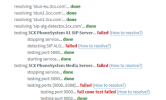
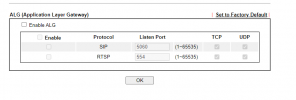
When I am running the firewall checker I cannot pass this stage. I have disabled the SIP_ALG by telnet still same.

1655144483109.png

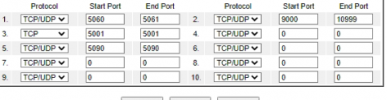
The ports which I have opened for 3CX
1655144654806.png

Using a draytek router .

thanks
 
  • Like
Reactions: Networkbug
  • Like
Reactions: Networkbug
Have you confirmed under NAT > ALG?
 
Are you running the latest firmware?
 
reboot the router
 
Hello all,

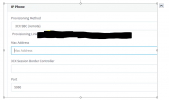
I have SBC setup in one branch and can verify it in sip trunk but I cannot view my phones SIP41S by pnp in 3cx portal, I am confused with 3cx session border controller which ip or link I have to enter here?

1655997001697.png
 
Ensure your phone is on the latest supported firmware and reboot it.

MAC address is the address of the phone behind the SBC.

Enter the IP of the SBC in the field under it.
 
  • Like
Reactions: Networkbug
Ensure your phone is on the latest supported firmware and reboot it.

MAC address is the address of the phone behind the SBC.

Enter the IP of the SBC in the field under it.
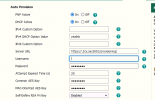
Okay I have updated the phone to latest firmware and Can see the phone show up. When I assign the phone to an extension, I can see the provision link which I used to auto provision with provided username and password. and it does not auto provision.
Am I missing any step? I have disabled the firewall on both sides.

1656049669536.png1656049689383.png
 
You dont need to disable any fire walls as long as your 3CX MGMT console is passing the firewall tests then you're fine.

Make sure your extensions are set up to be blocked using SBC.

You may have to turn up the logging on your mgmt console and look in the activity logs to see if you can see why it isnt provisioning.
 
  • Like
Reactions: Networkbug
You dont need to disable any fire walls as long as your 3CX MGMT console is passing the firewall tests then you're fine.

Make sure your extensions are set up to be blocked using SBC.

You may have to turn up the logging on your mgmt console and look in the activity logs to see if you can see why it isnt provisioning.
Yup, I checked the logs and on branch. IP was getting blocked, switched to SBC local ip and it just worked!

Now I am getting firmware is not supported- Will I be able to downgrade to 3cx supported version?
1656058511468.png
 
Status
Not open for further replies.

Forum statistics

Threads
111,974
Messages
590,083
Members
164,900
Latest member
Silent_Guru