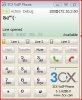
3CX softphone : click on keys

Status
Not open for further replies.

gbt

Joined
May 15, 2009
Messages
4
Reaction score
0
When clicking on the 3cx softphone keys,the number is not displayed :shock: . Example : when clicking on 1, & is displayed. on 2 : é, etc. When typing the number on the keyboard, everything is correct. See attached.
 
Hi,

I think you may have a problem with your VoIP Phone install, I don't se this problem with my Phone.

Any one else?

Regards,

Emmet.
 
gbt said:
When clicking on the 3cx softphone keys,the number is not displayed :shock: . Example : when clicking on 1, & is displayed. on 2 : é, etc. When typing the number on the keyboard, everything is correct. See attached.
Hi

This is a first, never until now heard about this behavior :roll:
I need to know softphone's version (as it is xx.xx.xx) and if this behavior is consistent from restart to restart - I mean, if everytime, always, when you click 1 phone displays & (also for 2,3, ...)

Regards
vali
 
The version of the 3cx client is 3.1.6288. Tried on many PC : Winxp, vista. PC : windows French version ; server : windows XP french version. The characters are always the same (1=& ; 2=é ; 3=" ; 4=' ; 5=( ; 6=- ; 7=è ; 8=_ ; 9 = ç ; 0=à). This is strange and corresponds exactly to the french keyboard. What is strange too, when I am in caps lock or I press shift, the numbers clicked are displayed correctly
 

Attachments

  • Capturer.JPG
    Capturer.JPG
    33.3 KB · Views: 2,248
gbt said:
The version of the 3cx client is 3.1.6288. Tried on many PC : Winxp, vista. PC : windows French version ; server : windows XP french version. The characters are always the same (1=& ; 2=é ; 3=" ; 4=' ; 5=( ; 6=- ; 7=è ; 8=_ ; 9 = ç ; 0=à). This is strange and corresponds exactly to the french keyboard. What is strange too, when I am in caps lock or I press shift, the numbers clicked are displayed correctly
Hi

Thank you for your feedback. If I correctly understand, do you have a primary/secondary french keyboard layout installed? I'm asking because I want to create the same environment as yours - at this time, I have installed on my machine just a secondary language, not keyboard layout also, so then I will install one.

I will try to provide you an answer as soon as possible.

Thanks again. Regards
vali
 
Hi all,

I have installed 3CX VOIP Phone v3.1.6288.0 on PCs/notebook running Win XP Pro and Win Vista Home Premium and I don't encounter the problem as reported by gbt. Whatever key is pressed, the correct character is displayed.

Suspect it could have something to do with language version on the PC?

Regards,
Ian
 
This is most likely due to a 'feature' of the AZERTY keyboard layout, although I'm surprised it hasn't come up earlier

Here is some more info: http://en.wikipedia.org/wiki/AZERTY
The digits 0 to 9 are on the same keys, but the shift key must be pressed to type them. The non-shifted keys are used for accented lowercase characters.
 
Hi Ian, eirNetics

Thanks for your feedback 8)
I expect to be something related with the keyboard layout, but even in such a case as AZERTY described by eirNetics, Voip Phone should behave properly - which seems doesn't happen. As I said, never met this issue before, we will check and will provide an answer soon.

Thanks again
vali
 
Hello all and thanks for your support.

I can confirm that if I set the keyboard to ENglish, it works perfectly !
 
ok, I can confirm also - I've tested and indeed there is a bug into the Voip Phone.

Test: From control panel, Regional and Language options, I've installed the French(Belgium) language and a MIME French keyboard and, voila, while the phone being active switching to French language, by clicking dial buttons wrong characters appeared.

Thanks for feedback - this issue will be fixed on first or next release, I will warn you then.

Regards
vali
 
gbt said:
Hello all and thanks for your support.
Hi again
Now I am the one who needs support - from you 8)

- please open a Notepad and set the keyboard layout to the one which generates wrong characters in Voip Phone (French I guess) then type common digits - as you type them on the voip phone - and tell me if they appears properly in the Notepad, or also as wrong characters.

Why I'm asking you: my keyboard is an english one. By setting a French keyboard layout (FR indicator next to the clock), as I said, in the Voip Phone I get wrong characters when typing "english" digits, but I got them wrong also in the Notepad or in the XLite. That means is not a Voip Phone (or Notepad/Xlite) problem, but a mismatch between physical keyboard layout and the logical one (FR in my example) set to Windows.

I'm looking forward for your reply - thanks.

Regards
vali
 
Hello,

I've got the right characters when I type either in a notepad or in the VOIP Client. The problems comes when CLICKING on the VOIP client keys, not when TYPING on the keyboard. And strange thing, if CAPS LOCK is ON, when I CLICK on VOIP client keys, I get the right characters.
 
hello,

same problem. in fact it's problem of keyboard. when we use en default keyboard it's work.
 
Status
Not open for further replies.

Latest Posts

Forum statistics

Threads
112,330
Messages
591,908
Members
165,483
Latest member
AshleyStokes