Solved 3CX Softphone - No numbers displayed

Status
Not open for further replies.

siscom

Customer
Basic Certified
Joined
Jul 14, 2009
Messages
237
Reaction score
37
Good Afternoon Colleagues
I hope you are doing good and save.

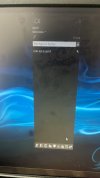
One of my customers has more than 3CX softphone installed (3 workstations) . Suddenly , One the 3CX softphones can't display information regarding other online 3CX softphones , Also can't display information about received calls , abandoned calls, etc..Inspite of this , This softphone can send/receive calls successfully.

Other 3CX softphones are ok.

Attached with this message snapshot from this softphone.

Do you have any suggestion for the reason and the solution of this issue?

Best Regards
 

Attachments

  • 3CX Phone.jpg
    3CX Phone.jpg
    128 KB · Views: 6
Hi @siscom,

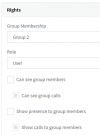
First I'd check the Group rights, and then the extension rights. What group are they in? Go into the Group via Users >> Groups and check the user rights / management rights (dependant on the extension's assigned role). Make sure that 'Can see group members' and 'Show presence to group members' is enabled.

1638174235748.png

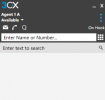
The above renders the following result:

1638174264353.png

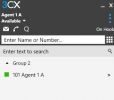
After enabling these options, you'll see the following:

1638174522242.png
 
Hi @siscom,

First I'd check the Group rights, and then the extension rights. What group are they in? Go into the Group via Users >> Groups and check the user rights / management rights (dependant on the extension's assigned role). Make sure that 'Can see group members' and 'Show presence to group members' is enabled.

View attachment 26212

The above renders the following result:

View attachment 26213

After enabling these options, you'll see the following:

View attachment 26214
Good Afternoon Vasilis
Thx for your replay . I would like to share with you that i am using the default group and all users are in this default group.

I also make sure that both 'Can see group members' and 'Show presence to group members' is enabled.

So kindly advice.

Best Regards
 
Hi @siscom,

On that PC, if you log in to the Web Client, does the people list show the Default extensions there or not? (You can try the new Desktop App as well if you'd like).
 
Hi @siscom,

On that PC, if you log in to the Web Client, does the people list show the Default extensions there or not? (You can try the new Desktop App as well if you'd like).
Hello Vasilis
Let me check and will feedback you.

Best regards
 
  • Like
Reactions: VasilisV_3CX
Good Morning Vasilis
I hope you are doing good . The 3CX Phone worked perfect and i don't know the reason . It seems that the operating system of workstation is not working as expected.

Thx for your support and you can close this case.

Best Regards
 
  • Like
Reactions: ChrisC_3CX
Glad to hear this got sorted regardless of the reason.

If it does happen in the future, I'd recommend checking another PC on the same network with the same extension to see if you get the same behavior. If you don't you might need to check the specific PC for things like Windows firewall configuration restrictions, Antivirus software, or any other 3rd party software that might be interfering.

Please feel free to start a new thread should anything else come up!
 
  • Like
Reactions: siscom
Status
Not open for further replies.

Forum statistics

Threads
111,974
Messages
590,081
Members
164,899
Latest member
mazet