Solved 3CX StartUP

Status
Not open for further replies.

modem7

New User
Joined
Sep 24, 2021
Messages
9
Reaction score
2
Hey guys,

I've currently got a self-hosted version of 3CX on AWS with a sipgate.co.uk trunk, and saw your email regarding StartUP.

Is there a way to migrate to the new platform from AWS including FQDN + trunk/restore from backup etc? Or would the trunk only be available in the startup pro plan?

Would there be a way to transfer my current number to the free plan inbound?

Bar the trunk, I fall within the startup free plan requirements.

Cheers
 
Hi @modem7,

Please be noted that the cloud-native edition is only applicable for 3CX hosted instances at the moment. If you would like to test it, you need to move to a 3CX hosted instance.
 
Hi @modem7,

Please be noted that the cloud-native edition is only applicable for 3CX hosted instances at the moment. If you would like to test it, you need to move to a 3CX hosted instance.

That's not a problem at all, fewer interconnecting systems are always a plus.

But the question still stands, would I be able to migrate from my AWS hosted instance to a 3CX hosted instance to have the ability to use the same FQDN, and transfer my current number from sipgate to yourselves?
 
  • Like
Reactions: AndreasY_3CX
Hi,

>>> Would I be able to migrate from my self-hosted instance to a 3CX hosted instance to have the ability to use the same FQDN

Yes, you're definitely able to transfer your self-hosted instance to 3CX hosted with the same FQDN if you're not using a custom one. If you need the steps on how to do it, please let me know.

>>> transfer my current number from sipgate to yourselves

Unfortunately, we do not provide sip trunk services to our customers. Please check the available and recommended SIP providers here.
 
Heya,

Sounds perfect - yes please, if you could provide the instructions that would be great.

Regarding my current SIP trunk, would I be able to utilise my current sipgate.co.uk provider on the StartUP Free plan?

Thanks!
 
Hi,

My apologies for my wrong answer but you're not able to use a selected FQDN as it will be generated automatically during the deployment in StartUp deployments.

If you want to migrate to 3CX hosted by using the same FQDN, you can download a backup file from your old instance and use it in a dedicated 3CX hosted machine.

If you still want to try out the StartUp you can do the following:
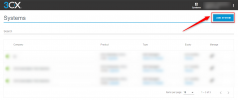
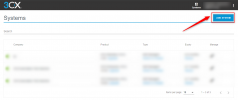
  • Login to your customer portal and under the Systems page select Add System button (if not visible clear your browser cache and try again).
1651763121450.png
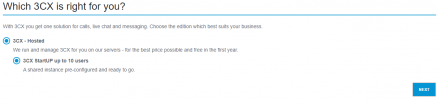
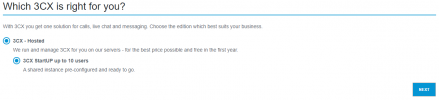
  • Select 3CX - Hosted and 3CX StartUP UP to 10 users and press the next button
1651763462839.png
  • Apply your company details and press the next button.
  • Follow the next steps to complete your deployment.

>>> Regarding my current SIP trunk, would I be able to utilise my current sipgate.co.uk provider on the StartUP Free plan?

Unfortunately, the SIPGATE provider is not available in 3CX StartUP instances. The 3CX StartUP edition supports a number of SIP trunks providers. They have been selected based on ease of configuration, ease of account setup and pricing.
 

Attachments

  • 1651762053543.png
    1651762053543.png
    121.7 KB · Views: 15
  • 1651763459248.png
    1651763459248.png
    17.5 KB · Views: 15
  • Like
Reactions: AlexisV_3CX
Status
Not open for further replies.

Forum statistics

Threads
111,974
Messages
590,081
Members
164,899
Latest member
mazet