3CX & Teams Direct Routing - User script says no users

mososki

Silver Partner
Advanced Certified
Joined
Oct 15, 2024
Messages
19
Reaction score
4
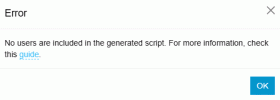
When I go to create the User Script for Teams within 3CX I get this error:
1752168036437.gif

All my users are flagged under Users/Options for Teams Integration as follows:

1752168098843.png
Is this because I have the wrong license type assigned to my test user account?

Here is the license assigned to test account:
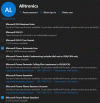
1752168154488.gif

A few users seem to show Teams integration: (Last two entries show Teams icon checked)
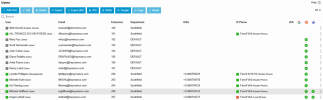
1752168199674.gif

These users have different licenses:
1752168269899.gif
Is this the source of why no users are included in the script?

M365 integration says it is running and synched OK.

Any ideas?
 
Please refer to the guides below first, as they contain all the required information. Uncheck any license forms for users other than the Microsoft Teams phone Standard, and ensure you also have a 365 license.

365 guide: https://www.3cx.com/docs/manual/microsoft-365/
Direct routing: https://www.3cx.com/docs/microsoft-teams/

And most importantly, this guide: https://www.3cx.com/docs/microsoft-teams-integration-faqs/

You will need to run through and remove any previous team's configuration, so that you can then integrate with 3CX.

If you are currently using other services to connect Teams to 3CX, remove them and revert the direct routing configuration to its default settings. This will significantly help avoid errors in your configuration and enable the clean assignment of users.

  1. Revert Teams users’ policies to the default “Global (Org-wide default)”. This is commonly set for: Calling policy, Dial plan and Voice routing policy.
  2. Clean up existing dial plans by calling Get-CsTenantDialPlan and then removing all where the “Identity” is not “Global” with Remove-CsTenantDialPlan.
  3. Repeat the same for “get-CsOnlineVoiceRoutingPolicy”, “Get-CsOnlineVoiceRoute”, “Get-CsOnlinePstnUsage” and “get-CsOnlinePSTNGateway” to find and remove unnecessary configuration.
 
  • Like
Reactions: Evolute IT
Please refer to the guides below first, as they contain all the required information. Uncheck any license forms for users other than the Microsoft Teams phone Standard, and ensure you also have a 365 license.

365 guide: https://www.3cx.com/docs/manual/microsoft-365/
Direct routing: https://www.3cx.com/docs/microsoft-teams/

And most importantly, this guide: https://www.3cx.com/docs/microsoft-teams-integration-faqs/

You will need to run through and remove any previous team's configuration, so that you can then integrate with 3CX.

If you are currently using other services to connect Teams to 3CX, remove them and revert the direct routing configuration to its default settings. This will significantly help avoid errors in your configuration and enable the clean assignment of users.

  1. Revert Teams users’ policies to the default “Global (Org-wide default)”. This is commonly set for: Calling policy, Dial plan and Voice routing policy.
  2. Clean up existing dial plans by calling Get-CsTenantDialPlan and then removing all where the “Identity” is not “Global” with Remove-CsTenantDialPlan.
  3. Repeat the same for “get-CsOnlineVoiceRoutingPolicy”, “Get-CsOnlineVoiceRoute”, “Get-CsOnlinePstnUsage” and “get-CsOnlinePSTNGateway” to find and remove unnecessary configuration.
Met with data vendor yesterday. Client has M365 Premium licenses for all users. Added Teams Standard Phone license to test account. Still no calling between 3CX and Teams.

Question - what does the green checkmark under Teams field on users tab mean? Two of their users are set up with a Teams calling plan as well. They are the only ones with the green check mark. Does this come from Teams? Does lack of check marks mean incorrect license or configuration error?

Thinking of hiring a Teams consultant as data vendor has no experience with Teams Direct Routing. Consultant can review Microsoft configuration. Trying to understand what success looks like on 3CX side of things.

Data vendor telling client they need a different, more expensive Microsoft license to get this functional. I don’t think this is true.

Should this work with M365 Premium and Teams Phone Standard licenses?
 
Does the fact they have some users with a Microsoft Teams calling plan change the integration process? Should we run the routines as though teams was previously set up for direct routing and that should be cleared before following 3CX process? Will treating it as though there was existing integration and following process to clean up affect the users with a MS Calling Plan!
 

Members Online Now

No members online now.

Forum statistics

Threads
111,831
Messages
589,277
Members
164,660
Latest member
RJenkinsROCK