- Joined
- Jul 8, 2022
- Messages
- 11
- Reaction score
- 2
Hi all,
I am SF admin and I am experiencing issues with my 3CX integration.
1) Sometimes the calls are not logged at all, despite the call is registered in the Admin Console ":5001/#/app/call_log", they don¡t show in SF, no matter how many tries.
2) Other times the call is sync. to SF but does not bring some info, specially the [AgentFirstName] [AgentLastName]
Using this format: "Unanswered Outbound call to [Name] ([Number]) from agent: [AgentFirstName] [AgentLastName]"
It happens for both, Inbound and Outbound.
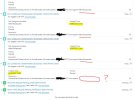
3) Some times the call is sync. to SF, but if we make 2 or 3 calls in a row the 1st one has no info for the [AgentFirstName] [AgentLastName], but the 2nd and 3rd and so on, those they have the proper Agent name (see the picture attached)
It happens for both, Inbound and Outbound, but substantially worse for INBOUND calls.
(could be because of call transfers between agents?)
---> As a side note, this happens under many different agents with diferent ways to approach the calls: click2call with Chrome, copy paste de number into the web-dialer, copy paste the number into the Desktop App... I couldn't find a pattern.
In all cases the Contact is detected in the Dialer (you can see the SF contact shown there)
I hope you can bring some light to these tricky situation, because under these circumstances it is impossible to track our agents effort.
Thanks in advance.
BR,
Carlos G.
I am SF admin and I am experiencing issues with my 3CX integration.
1) Sometimes the calls are not logged at all, despite the call is registered in the Admin Console ":5001/#/app/call_log", they don¡t show in SF, no matter how many tries.
2) Other times the call is sync. to SF but does not bring some info, specially the [AgentFirstName] [AgentLastName]
Using this format: "Unanswered Outbound call to [Name] ([Number]) from agent: [AgentFirstName] [AgentLastName]"
It happens for both, Inbound and Outbound.
3) Some times the call is sync. to SF, but if we make 2 or 3 calls in a row the 1st one has no info for the [AgentFirstName] [AgentLastName], but the 2nd and 3rd and so on, those they have the proper Agent name (see the picture attached)
It happens for both, Inbound and Outbound, but substantially worse for INBOUND calls.
(could be because of call transfers between agents?)
---> As a side note, this happens under many different agents with diferent ways to approach the calls: click2call with Chrome, copy paste de number into the web-dialer, copy paste the number into the Desktop App... I couldn't find a pattern.
In all cases the Contact is detected in the Dialer (you can see the SF contact shown there)
I hope you can bring some light to these tricky situation, because under these circumstances it is impossible to track our agents effort.
Thanks in advance.
BR,
Carlos G.
Attachments
Last edited: