3CX transcription not working & related questions

JAA IT Dept

Premier Customer
Joined
Feb 3, 2025
Messages
2
Reaction score
1
Following the information here: https://www.3cx.com/blog/releases/ai-analytics-u4beta/ :
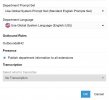
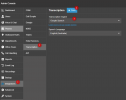
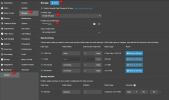
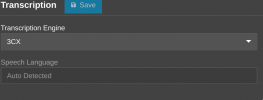
I created a new department called "Transcriptions", enabled transcription and call recording, then added a couple test users. Then set the transcription engine to 3CX.
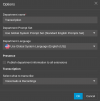
03.02.2025.56s.png
03.02.2025.26s.png
03.02.2025.34s.png
03.02.2025.16s.png03.02.2025.00s.png

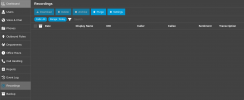
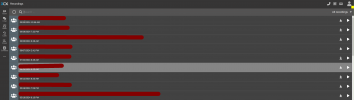
So firstly, the recordings section in the admin console is empty, not sure why or if its related. However in the users own recordings section the recordings are listed, but no transcriptions.

According to: https://www.3cx.com/blog/releases/v20u4-call-transcription/
"we’re providing enterprise users with complimentary access until the end of 2024. This is your chance to explore AI-driven transcription at no cost for a limited time. ... From 2025, transcription - and later analytics - will transition to a separate license upgrade."

I had first tried this in December 2024 and it was the same as you see here. So my questions are:

1. Am I missing some configuration?
2. Is there anything logged about transcription failures / successes? I Have not found any.
3. If something is transcribed, where should it be?
4. Why is the admin recordings screen empty? Should I not be able to see all recordings here?
5. What is the current state of 3CX's plan to move the transcription feature into a separate license? Is it still free currently?

Thanks
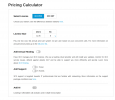
 
In the pricing calculator of the 3cx website it shows the "Add AI" switch, which is greyed out with a "coming soon" hover. Could anyone confirm if the 3cx transcription feature is supposed to be working right now? Have there been any announcements on when the license / feature will become available?05.02.2025.17s.png
 
  • Like
Reactions: MayurPatel
Hi @JAA IT Dept

The transcription should be working without needing any extra license for now.
From the screenshots you provided in your initial post, the configuration seems correct.
However the screenshot showing the users recording section shows recordings up to September 30th. The screenshot showing the admin section recordings are filtered for "Today", so this is why you are not seeing those recordings from the admin section.

Note though that the transcription feature will not transcribe already existing recordings. From the time you enable the feature, any call that is recorded and the configuration as such that it should be transcribed, will be transcribed.

So with the current configuration, if you make a call with those 2 extensions, do you not get any transcription?
The transcription will be visible in the Call report, in the Recordings (admin section) and in the users Recordings (paper like icon on the right).
 
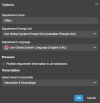
Hello all. I am also trying to figure out transcription, just for voicemails ( and then delivered to email) and I do not see these options. Under the department section and transcription the only option I see that is greyed out and it says no transcription.

I have a 3cx v20 version of 8sc pro hosted by 3CX. Is that the problem where it is hosted, do i have more features if another cloud provider hosts it?
 

Attachments

  • 3cx.jpg
    3cx.jpg
    47.6 KB · Views: 19
I have setup the Google speech to text api key, however, I see no place in the hosted by 3CX instance to setup. Is it a hosting by them issue and I need a different provider?
 
Transcription is also working in the Hosted by 3CX instances.

1739950436347.png

After this, you will hae to go set up your Google Storage

1739950511213.png

Then you should be able to see the transcription settings available in the departments and the users

1739950826818.png
 
  • Like
Reactions: GregG_3CX
Transcription is also working in the Hosted by 3CX instances.

View attachment 46572

After this, you will hae to go set up your Google Storage

View attachment 46573

Then you should be able to see the transcription settings available in the departments and the users

View attachment 46574


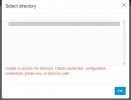
Thank you for the information and screenshots, that was helpful. I believe I followed all the steps, but when I try to enable Google storage, I enter the json key and I get an error when trying to choose the folder to use.
 

Attachments

  • error.jpg
    error.jpg
    16 KB · Views: 11
Do make sure that you have followed all the steps, becaue even if 1 role is not given correctly, it will not allow you to connect.

You may have to regenerate your JSON file as well after that.

https://www.3cx.com/docs/google-cloud-storage/
 
  • Like
Reactions: GregG_3CX
ok....will delete everything in google and try again. thought I had it correct
Thank you for the help. Must have had something wrong. Getting closer. Google storage has been added, I turned transcription on and selected English. I have set the option to transcribe voicemails only. Now when I do a test voicemail, the audio file delivers to email as expected, in the email it says Transcription: and is blank. Nothing is transcribed. Ideas??
 
Do make sure that you have followed all the steps, becaue even if 1 role is not given correctly, it will not allow you to connect.

You may have to regenerate your JSON file as well after that.

https://www.3cx.com/docs/google-cloud-storage/
Thank you for the help. Must have had something wrong. Getting closer. Google storage has been added, I turned transcription on and selected English. I have set the option to transcribe voicemails only. Now when I do a test voicemail, the audio file delivers to email as expected, in the email it says Transcription: and is blank. Nothing is transcribed. Ideas??
 
OK, so the storage is configured. https://www.3cx.com/docs/voicemail-transcription/

You will need to go into your Google account and enable the transcription on Google. I missed that earlier on. Oops! Your previous configuration is still valid, you just need to add the transcription settings.
 
OK, so the storage is configured. https://www.3cx.com/docs/voicemail-transcription/

You will need to go into your Google account and enable the transcription on Google. I missed that earlier on. Oops! Your previous configuration is still valid, you just need to add the transcription settings.
I saw an earlier post and tried that, went through all steps again. But same result, transcription in email is blank.
 
OK, so the storage is configured. https://www.3cx.com/docs/voicemail-transcription/

You will need to go into your Google account and enable the transcription on Google. I missed that earlier on. Oops! Your previous configuration is still valid, you just need to add the transcription settings.
I saw an earlier post and tried that, went through all steps again. But same result, transcription in email is blank.
 
Update on this.....I upgraded to v20 update 5 and chose 3cx as the transcription service instead of google...works great.
 
  • Like
Reactions: NicholasP_3CX

phonesconnect how did you get this to work we are running accross the 3cx app VM shows the transcription. But the email doesnt work​


Members Online Now

Forum statistics

Threads
111,831
Messages
589,277
Members
164,660
Latest member
RJenkinsROCK