3CX UDM-PRO PROXMOX VM - Port 5001 not working and QR code provision Issues

Status
Not open for further replies.

TheTechDev

Free User
Joined
May 23, 2023
Messages
27
Reaction score
0
Hello, I have a UDM-Pro and i am running 3CX on Proxmox VM and i can not access Port 5001, All other 3cx ports are working but 5001 is not working, Can only access 3cx via internal 192.168.1.134 ip.
The 3CX FQD does not work and QR code provisioning just says failed even though its trying to provision through 192.168.1.134/provision/numbers&letters , I tried to search that in browser but it said invalid weblink.

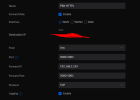
The system seems to be working fine otherwise, Any helps would be amazing. See screenshots for more information


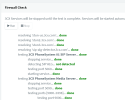
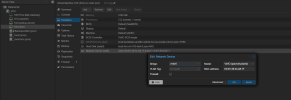
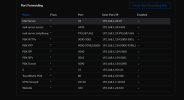
View attachment 35618View attachment 35619View attachment 35621View attachment 35623
 
What does the firewallchecker say? Did you configured your firewall?
 
All the screenshot links show a permission error.

Define "not working"...incorrect DNS resolution? No DNS result?

Do you have split DNS set up? If not, and if it is resolving to your public IP, you'll usually need to set up NAT reflection in your router so LAN devices can use the WAN IP to get back inside to the server on LAN.
 
What does the firewallchecker say? Did you configured your firewall?
Fire wall checker says all checked passed, Port checker site says port blocked.

UDM Pro is properly port forwarded, I called ISP and they said they are not blocking the port either.
 
All the screenshot links show a permission error.

Define "not working"...incorrect DNS resolution? No DNS result?

Do you have split DNS set up? If not, and if it is resolving to your public IP, you'll usually need to set up NAT reflection in your router so LAN devices can use the WAN IP to get back inside to the server on LAN.
I do not have split DNS setup, Its just a UDM Pro from ubiquity there is no Nat reflection options. All other ports and servers/services work fine including wordpress and nginx on port 443. The only port blocked is port 80 and 5001, Port 80 idc about but 5001 is essential. Would it be worth switching to 443 and using nginx to reverse proxy to 3cx?
 
imgur [dot] com/a/NkIlCav
 
I have this working without problems with Unifi products. Show some screenshots from your portforwarding. When you use the lokal adress, do you use the port 5001 or which one? And please just upload the pictures here and not somewhere else
 
Fire wall checker says all checked passed, Port checker site says port blocked.
?? did the test passed or not? The firewallchecker on the 3cx admin interface.
 
I have this working without problems with Unifi products. Show some screenshots from your portforwarding. When you use the lokal adress, do you use the port 5001 or which one? And please just upload the pictures here and not somewhere else
Il try to add the screenshots again here but last time said permissions issue for people to view it.
It should have a copy of all the port forwards. I suspect the issue lies with the VM or proxmox maybe?
 
?? did the test passed or not? The firewallchecker on the 3cx admin interface.
The 3cx firewall checker did pass but it does not test port 5001, All other services work fine just not provisioning softphone/app and cant access web admin or web client from anywhere but local IP.
 
RTP ports missing some. Is the firewall on the proxmox vm active?
 
Think this thread is going on too long for the issue in question!

it's time to go back to the start and do some basic troubleshooting.

Forget your external firewall until you can get on to the FQDN locally. (Split DNS required).

What do you get when you ping FQDN? Local or external?

You can get on to your 3CX fine with the IP - Great! but not on 5001 - So, did you change this?

within the mgmt console go to settings > parameter and search for WEB_ROOT_

What port is on the end of your URL?

You've probably ended up setting port 80 or 443 (or both) during set up.

You will need to either use port direction (5001 > 443) or take a backup and reinstall your 3CX then set up and leave default ports during set up.
 
Last edited:
  • Like
Reactions: bitn2
I have the same exact setup as you do. Mine works fine, with the only difference being my port forward rules are all in one rule instead of split out like yours.

Have you tried putting "5000,5001" instead of "5000-5001" in the port range?
 
RTP ports missing some. Is the firewall on the proxmox vm active?
Yes it works fine, i had to leave some ports out due to conflicts with udm Pro VPN but still works fine for that purpose, Just trying to fix web access and provisioning
 
Think this thread is going on too long for the issue in question!

it's time to go back to the start and do some basic troubleshooting.

Forget your external firewall until you can get on to the FQDN locally. (Split DNS required).

What do you get when you ping FQDN? Local or external?

You can get on to your 3CX fine with the IP - Great! but not on 5001 - So, did you change this?

within the mgmt console go to settings > parameter and search for WEB_ROOT_

What port is on the end of your URL?

You've probably ended up setting port 80 or 443 (or both) during set up.

You will need to either use port direction (5001 > 443) or take a backup and reinstall your 3CX then set up and leave default ports during set up.
Pinging the FQDN sagiofwortley.3cx.ca from outside the network 100% loss no connection
Same with inside the network, doing my public ip:5001 does not work either though from either.
Pinging the ip only works from both internal and external.

I left default 5001, I think i found the issue, Webroot shows no port at all :/ Is this possible?

Any other ideas?
 
Pinging the FQDN sagiofwortley.3cx.ca from outside the network 100% loss no connection
Same with inside the network, doing my public ip:5001 does not work either though from either.
Pinging the ip only works from both internal and external.

I left default 5001, I think i found the issue, Webroot shows no port at all :/ Is this possible?

Any other ideas?
Stupid thing is set to use 443, i just changed the port forward rules and it is 443...
 
Stupid thing is set to use 443, i just changed the port forward rules and it is 443...
Can I change it without reinstall by updating the Web_root_ paths?
 
Status
Not open for further replies.

Forum statistics

Threads
111,974
Messages
590,081
Members
164,899
Latest member
mazet