3CX Update 6 Alpha: Improved Call Data Records & Reports

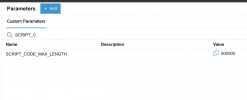
Add the parameter(SCRIPT_CODE_MAX_LENGTH) in 3CX parameters settings
1744711816721.png

1744711854489.png

I tried, but I'm getting a 'ScriptCode: Invalid Value' error.
Am I missing something?"
 
View attachment 47477

View attachment 47478

I tried, but I'm getting a 'ScriptCode: Invalid Value' error.
Am I missing something?"
Previously, when we uploaded CFDs to 3CX Update 5, we encountered the error "ScriptCode: Invalid value". After deleting some components, we were able to upload them successfully.

We consulted 3CX Support and learned that the new version has a limitation on the length of CFDs. By adding the parameter, we finally succeeded in uploading the original CFD files.

If you encounter the same issue as we did, you can try to change it to a larger value and try it.
 
  • Like
Reactions: NikosT_3CX
Previously, when we uploaded CFDs to 3CX Update 5, we encountered the error "ScriptCode: Invalid value". After deleting some components, we were able to upload them successfully.

We consulted 3CX Support and learned that the new version has a limitation on the length of CFDs. By adding the parameter, we finally succeeded in uploading the original CFD files.

If you encounter the same issue as we did, you can try to change it to a larger value and try it.


@Grace Liu Thank you so much for your support.


After adding the parameter, I was able to successfully upload the IVR.


@3CX Team – Could you please confirm if this method is officially supported and recommended by 3CX? Will it continue to work in future updates? Also, is there a recommended or more efficient solution for handling large IVRs with multiple components?

Further, as Grace mentioned, the new version has a limitation on the length of the CFD.
Could you please confirm what the specific limit is and share the details?
 
You should write the script in a more efficient way, 10K lines is too much, simple as that. You can bypass it if you like but on busy systems you might have an issue. Depends what the script is doing. We do not support your scripts, whether more then 10K lines or not....
 
You should write the script in a more efficient way, 10K lines is too much, simple as that. You can bypass it if you like but on busy systems you might have an issue. Depends what the script is doing. We do not support your scripts, whether more then 10K lines or not....
Thanks for the clarification.


If we split the script, could you please confirm what the limit would be per CFD?


Also, in the meantime, can we resolve the issue by adding parameters Grace Mentioned above.
 
We don't impose any limits. If you make your own scripts you have to apply your own testing and optimize yourself. Keep in mind we will run this script for every call coming in. So on a 128 sim call system it can be executed 128 times at the same time on a real time system (voice and video delivery).

It could be a super fast 500 line script or you could be calling a CRM that is very slow to respond and then even if its 5 lines its a killer for the system. Or load up 10k entries from a text file into memory and search thru it for each call (yes I saw it on the forum here) So think about the repercussions of the script.
 
Last edited:
In addition to managers being able to select multiple departments in the reports, is there any sight of a allowing managers of one department to pull report data of other departments they are not a member of? There was mention quite a while back.

Currently, as many have mentioned, we can't give access to reporting (give Manager role) as it exposes admin functions such as full access to the user's node etc. If we could a least put them in a new department, with a different "manager" extension number to login with, then at least we could limit access to editing extensions in other departments etc.

We have tried give them the role, and they have proven, that training them to not edit, add, delete items in admin nodes exposed, other than reporting, just doesn't work. Even the nicest, capable users think they are being "helpful" and change things.

This is especially true for systems 3CX partners manage fully (IT, configuration) for the clients. There's essentially two types of managers: the client business managers who need access to reports, recordings, Receptionist role features, office hour overrides, inputting holiday schedules etc. All of the things to run the business.

But that's a completely different role than managing the phone system from a configuration, technical, IT aspect.

Since v20, we've been managing pulling and scheduling reports for client systems which is an added burden, but a necessary trade off for not having the risk of changes to the system.

This reminds me, Receptionist role, clear and assign extensions option on the Teams page, has also been an issue for the same reasons.

Educating Receptionists hasn't been 100% successful. Then we get support tickets "we lost extension 1000 and all their recordings".

Ideally that would be better if separate rights in the view tab settings and or disable globally in System\Options if the system isn't used in a hotel environment.

Thanks guys. So much progress on v20!
 
We don't impose any limits. If you make your own scripts you have to apply your own testing and optimize yourself. Keep in mind we will run this script for every call coming in. So on a 128 sim call system it can be executed 128 times at the same time on a real time system (voice and video delivery).

It could be a super fast 500 line script or you could be calling a CRM that is very slow to respond and then even if its 5 lines its a killer for the system. Or load up 10k entries from a text file into memory and search thru it for each call (yes I saw it on the forum here) So I decline to respond to your question you have to think about the repercussions of the script yourself.
@N_G Noted. Thank you for your detailed response and continued support, as always.
 
  • Like
Reactions: N_G
  • Like
Reactions: rayt
My system won't let me log in nor reset password, though I can log into the main ad min account
What could be the issue ?

Please assist
 

Latest Posts

Forum statistics

Threads
111,990
Messages
590,164
Members
164,927
Latest member
tohoken1