3cx Update fails because it's already installed

Status
Not open for further replies.

yankee80

Forum User
Joined
Mar 17, 2022
Messages
11
Reaction score
2
Hi all

we're using an AWS hosted 3CX instance.

Version:
18.0 (Build 965)


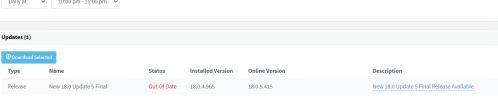
every night, we get this error during auto update. the log file says the update is already installed (contrary to what the Update page says)
----
3CX failed to update.


Your installation at xxxxx encountered a problem and the system rolled back to the previous version.


Attached are the updated log files which contain information about why the update failed.


Try updating again, and if the problem persists contact support and send the log files.

1668094263467.png
 

Attachments

If you are comfortable with CLI, what is the output of: apt list --upgradable?

What happens when you manually push the update instead of waiting for auto update?

What if you restart services/reboot system, is the update availible?
 
Thanks for your prompt reply Nathan

here's the output:
admin@ip-10-0-0-5:~$ apt list --upgradable
Listing... Done
3cxpbx/buster 18.0.5.418 amd64 [upgradable from: 18.0.5.415]
libc6/buster 2.28-10+deb10u1 amd64 [upgradable from: 2.28-10]
libexpat1/buster,buster 2.2.6-2+deb10u4 amd64 [upgradable from: 2.2.6-2+deb10u2]
 
That's good info to have in order to troubleshoot, however it ended up not being the packages I thought would be causing the problems...

Any positive results from the other ideas before the I suggest the messy ideas?
What happens when you manually push the update instead of waiting for auto update?

What if you restart services/reboot system, is the update available?
The quick and supported solution is take a backup and restore to a fresh install.
 
thanks Nathan

>What happens when you manually push the update instead of waiting for auto update?
1668228299956.png
it stops all services and kicks me out of webadmin. After logging on again, the update is still there.

>What if you restart services/reboot system, is the update available?
yes, the update shows up as usual after services/instance reboot

Regarding the reinstall/restore option, do we need to set up a new AWS instance, or can we reinstall it on the same AWS instance?

Thank you
Eric
 
Regarding the reinstall/restore option, do we need to set up a new AWS instance, or can we reinstall it on the same AWS instance?
We host ourselves, not AWS, but if you change IPs remember the TTL for a 3CX hostname and Pro license is 6 hours, vs Enterprise at 5 minutes.
As long as you format/start clean I wouldn’t think it matters?
 
Hi Steve

do you know whether it's possible to reinstall 3CX on our existing AWS instance- and then restore a config backup, or do we need to create a brand new AWS instance?
Thank you
Eric
 
Hi Steve

do you know whether it's possible to reinstall 3CX on our existing AWS instance- and then restore a config backup, or do we need to create a brand new AWS instance?
Thank you
Eric
Create a new instance. It's much easier.
 
  • Like
Reactions: TheodorosG_3CX
Status
Not open for further replies.

Forum statistics

Threads
111,974
Messages
590,081
Members
164,899
Latest member
mazet