• We do not provide troubleshooting help for unsupported phones. Please try with a supported phone.
  • V20 Update 10 Alpha 2 Learn more

3cx Upgraded and change provisioning link IP

Status
Not open for further replies.

heze54

Customer
Joined
Feb 7, 2022
Messages
2
Reaction score
0
Hi,

Recently, I upgraded from V16 to V18 perfect but 3cx had a bad IP using DHCP. After changing it to the correct, provisioning link is still pointing to the bad IP and some IP Phone are provisioned using this bad link.


Is there any way to change provisioning link to the correct IP?

Regards
 
Hi,

What provisioning method do you choose in the management console? (LAN/SBC/STUN)

Does the link on the provisioning page show the wrong IP when you add a phone do the extension?
 
Hi,

Using LAN


Regards
 
But does the link on the provisioning page show the wrong IP when you add a phone do the extension?

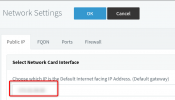
If so, then go to Management Console >> Settings >> Network, then ensure this IP shown here is now correct:
1644307875369.png

Press OK and the system should update itself to learn the new IP.

The system should ideally only have a single LAN card, if you have more I suggest uninstalling them.
 
Status
Not open for further replies.

Forum statistics

Threads
112,149
Messages
590,965
Members
165,170
Latest member
SupportRock