3CX v16 custom CRM template more questions

Status
Not open for further replies.

it145

Free User
Basic Certified
Joined
Feb 4, 2014
Messages
24
Reaction score
3
A quickish post that will hopefully resonate with and help others out there that might be having similar problems?

The custom CRM template idea is great and I hope the documentation and features around this continue to be enhanced.

Now the basics of the template are working there seems to be a few problems that can hopefully be easily overcome and are as follows:

  1. Caching, I can't find a definitive answer about this and we definitely have a problem. It seems a stale lookup has been cached and cannot be cleared, If we use a mobile to test an incoming external call, it displays an old CRM record that has not existed for at least 15-20 hours. If we run the template tool or an external CRM API call it returns the correct and latest record but 3CX still displays an old non-existing record?? We've restarted all service but still the old cached data seems to be showing on the incoming mobile call?
  2. If we create 2 "Matching Scenarios" much like the 3CX guide, if the first lookup fails it correctly does the second lookup and finds a record but despite this, if the "CreateContactRecord" scenario is enabled, it creates a contact? How do you prevent this?
  3. Further to question 2, I can't find a way to prevent the second lookup if the first lookup returns a match? The variables are not global and therefore I can't find suitable "Skip if" logic in the second lookup.
  4. Further still to question 2, if the first lookup fails but the second finds a match, the variables are not displayed in the CRM integration tool during testing, even though the output shows that a match was found. Not really a problem, more an observation.
  5. There is no example of how you can create a more complex JSON record (i.e. containing array data) for posting using the "CreateContactRecord", is this possible - I suspect not?
  6. Could someone confirm under what conditions "Allow empty response" is used for, presumably only Reporting scenarios?
  7. It's not clear on contact lookup what the purpose of the output is as the "ContactUrl" is used to display the full matching contact record? Can someone confirm where this Output information is used, perhaps for call journalling later on or is this information display in a popup during the call if more data exists?
  8. It's still not 100% clear how the "MaxCompareLength" works in the CRM integration editor testing? If this is set to 20 for instance (as this is a MAXIMUM not minimum) it doesn't match a number with 11 digits? When max is reduced to 11 or below a match is found as expected. How does this translate to when the XML is uploaded, I assume the "Advanced->Contacts->Options" settings are used, despite these appearing to relate to the built-in " 3CX contacts?
  9. What is the "DestinationEmail" under "Misc" for in the CRM integration editor?
Sorry if some of the questions might appear lazy but I'm a busy person have read the docs (perhaps not quite as fully as I should) and forum and have now spent more hours than seems should be necessary trying to get something relatively simple working. Any help, pointers or comments welcome and thanks to 3CX for monitoring these Forums.
 
Hello @it145,

Caching, I can't find a definitive answer about this and we definitely have a problem. It seems a stale lookup has been cached and cannot be cleared, If we use a mobile to test an incoming external call, it displays an old CRM record that has not existed for at least 15-20 hours. If we run the template tool or an external CRM API call it returns the correct and latest record but 3CX still displays an old non-existing record?? We've restarted all service but still the old cached data seems to be showing on the incoming mobile call?
Try deleting the contact from the 3CX Console > Advanced > Contacts.

If we create 2 "Matching Scenarios" much like the 3CX guide, if the first lookup fails it correctly does the second lookup and finds a record but despite this, if the "CreateContactRecord" scenario is enabled, it creates a contact? How do you prevent this?
The CreateContactRecord scenario is only invoked when the lookup scenarios don't return a valid record. Please note that the records returnd must have a Contact URL, and the phone number being searched, otherwise they're ignored, and the contact will be created anyway.

Further to question 2, I can't find a way to prevent the second lookup if the first lookup returns a match? The variables are not global and therefore I can't find suitable "Skip if" logic in the second lookup.
This expression should work:
XML:
SkipIf="[IIf([FoundRecordCount]>0,True,False)]"

Further still to question 2, if the first lookup fails but the second finds a match, the variables are not displayed in the CRM integration tool during testing, even though the output shows that a match was found. Not really a problem, more an observation.
You need to click on the proper scenario on the right, then the information for that scenario will be shown, including the variables.

There is no example of how you can create a more complex JSON record (i.e. containing array data) for posting using the "CreateContactRecord", is this possible - I suspect not?
Please take a look at the templates we provide with the 3CX installation. There are many examples there. The Zoho template for example has JSON arrays...

Could someone confirm under what conditions "Allow empty response" is used for, presumably only Reporting scenarios?
This is from the documentation:
AllowEmpty (bool) - When true, the scenario provides an output even when there is no record that matches the scenario rules, or when the whole request has been skipped. In this case the output will have an empty value for all values.
This is useful if you want to skip some intermediate scenario in a chain, due to some reason. For example, you need one request to get the main contact data (first name, last name, company id, etc.) and a second chained request to get the company name by its id. If the contact is not associated with a company, the second request will return no records. In this case, if AllowEmpty is not specified, it will not return any information from this contact, and that is incorrect as the contact is still valid.

It's not clear on contact lookup what the purpose of the output is as the "ContactUrl" is used to display the full matching contact record? Can someone confirm where this Output information is used, perhaps for call journalling later on or is this information display in a popup during the call if more data exists?
The ContactUrl output has 2 purposes:
  1. It's the "primary key" of the contact in 3CX contacts. So, when you update the contact record in your CRM, it can also be updated in 3CX.
  2. It's the URL used to popup the contact record on the agent PC, when they're using the Web Client.

It's still not 100% clear how the "MaxCompareLength" works in the CRM integration editor testing? If this is set to 20 for instance (as this is a MAXIMUM not minimum) it doesn't match a number with 11 digits? When max is reduced to 11 or below a match is found as expected. How does this translate to when the XML is uploaded, I assume the "Advanced->Contacts->Options" settings are used, despite these appearing to relate to the built-in " 3CX contacts?
There is a bug that we're fixing in Update 2 about MaxCompareLength that causes the behaviour that you explain here. The idea is that only the last N digits are compared when searching for contacts, this way the international country code for example can be ignored (if you receive the call without that prefix and the value in the CRM has it, or the other way around).
From Advanced->Contacts->Options you define the value for this setting.

What is the "DestinationEmail" under "Misc" for in the CRM integration editor?
This is not used at the moment. It's reserved for future use.
 
That all makes a lot more sense now, thanks for your prompt and detailed reply, which has helped a lot.

I'm still a little puzzled (because of what happened) by the ContactURL and 3CX Contacts. So for sure, the ContactURL is used to launch the relevant CRM contact web page using the ID (primary key) gleaned during the look up and this same key is used for the 3CX CRM contact record but...

  1. Why are you creating a contact CRM record in 3CX in the first place, is this not defeating the object of doing the CRM lookup? This explained why I appeared to be getting a stuck/stale lookup after the initial testing. The trouble is I deleted the CRM record to create a new one but (not realising it was created in 3CX Contacts as a special CRM Contact) any new matching CRM records failed because of the 3CX Contact CRM record that took precedence.
  2. The answer to 1 might explain this but if not...can this functionality be turned off and just a plain CRM lookup done every time, albeit at presumably the cost of a little traffic, processing and extra time? The "Enable contact creation" boolean seems to have no effect over the 3CX CRM Contact creation, only the creation from the template to CRM. I guess I'm missing something!
  3. I assume if the record is created in 3CX with the same ID and the details (Only Name, Company, etc, not numbers) changed later in the CRM, that will be reflected in 3CX during the next lookup but this still doesn't explain why the records created in 3CX in the first place as well as the CRM?

Sorry, I'm sure there will be a eureka moment soon ;)
 
Why are you creating a contact CRM record in 3CX in the first place, is this not defeating the object of doing the CRM lookup? This explained why I appeared to be getting a stuck/stale lookup after the initial testing. The trouble is I deleted the CRM record to create a new one but (not realising it was created in 3CX Contacts as a special CRM Contact) any new matching CRM records failed because of the 3CX Contact CRM record that took precedence.
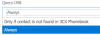
This is by design, the integrations grab the contact details from the CRM and insert them as new contacts in 3CX. The synchronization is only adding contacts. If you delete a contact in the CRM, it will not be deleted from 3CX. In 3CX v16 Update 1 you have a setting to control if you want that 3CX always queries the CRM, or only when the contact is not found in 3CX Contacts. This is in the CRM configuration page:
10976

Depending on your selection here, the contact from 3CX contacts will take precedence or not.

The answer to 1 might explain this but if not...can this functionality be turned off and just a plain CRM lookup done every time, albeit at presumably the cost of a little traffic, processing and extra time? The "Enable contact creation" boolean seems to have no effect over the 3CX CRM Contact creation, only the creation from the template to CRM. I guess I'm missing something!
Check the setting I just mentioned. Also, please note that the is a 10 minutes cache, so if you receive a call from the same number twice in less than 10 minutes, the second time 3CX will not query the CRM, the information will be taken from cache.

Regarding contact creation, yes, that's what the setting is meant for. The returned contact is always created in 3CX contacts, the setting is to create it or not in the CRM.

I assume if the record is created in 3CX with the same ID and the details (Only Name, Company, etc, not numbers) changed later in the CRM, that will be reflected in 3CX during the next lookup but this still doesn't explain why the records created in 3CX in the first place as well as the CRM?
Exactly, the record will be created in the CRM with the details you provide, and then you should edit that record from the CRM, so the next time this customer calls, the record is synchronized in 3CX Contacts.
 
Thank you, that clarifies everything. Oops I somehow missed that setting, although it does merge with all the other parameters setup in the template which might explain it.

I'll need to spend more time on this when there is a chance but the flexibility is great.

Presumably if we wanted to write custom text into the journal entry of a call, we would have to come up with are own intermediary system to collect the input and then update the CRM record accordingly?

I know your pushing the Web client more than the native Windows version but is there any reason the CRM ContactURL is only displayed if the Web client is open, not the Windows client? I checked the integration settings but there doesn't appear to be a setting?
 
Presumably if we wanted to write custom text into the journal entry of a call, we would have to come up with are own intermediary system to collect the input and then update the CRM record accordingly?
Yes, the template can only send predefined variables to the CRM, not custom notes taken by the agent. Maybe you can leave the note open, so the agent can add notes after the call has ended.

I know your pushing the Web client more than the native Windows version but is there any reason the CRM ContactURL is only displayed if the Web client is open, not the Windows client? I checked the integration settings but there doesn't appear to be a setting?
You're correct, the Contact URL is only shown by the Web Client. You need to be using it when you have a CRM integration enabled.
 
Thank you very much for all the assistance and I'm sure other questions will arise as and when there is time to look into this further - For now it#s working really well.

Please consider this closed from my point of view.
 
Status
Not open for further replies.

Latest Posts

Forum statistics

Threads
112,324
Messages
591,897
Members
165,475
Latest member
lastshadow