3CX v18 "Client GUI" Problems

Status
Not open for further replies.

SyncWave

Silver Partner
Joined
Oct 25, 2013
Messages
186
Reaction score
63
  • Click to dial
    • :TEL URL launches don't seem to work from firefox, it does nothing
    • Chromes "make a call from" click to dial is set to 3CX desktop app but it does nothing
    • Other: can't seem to find anyway currently to get click to dial functions to work in version 18 web/desktop
  • Desktop chat:
    • Right click copy image and paste in chat doesn't work, does in web client.
    • Spelling correction, it red underlines incorrect spelling but offers no solution or alternative to correct it, works in web client
  • Web Client Plugin
    • Seems to be removed from easy access viewing in web, the old install and activate. No longer needed? No longer works?
  • Side Tabs (glad they have words again)
    • Personally I think Contacts is more useful than the team tab. Chat with team and calling to team or members in all in the chat area now
    • Its not that crowded, do we need to truncate the last 3?
    • Would be nice to have templates for this section when we clone an extension it clones what you want visible/hidden/truncated.
 
Hi!

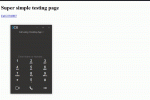
:TEL URL launches don't seem to work from firefox, it does nothing
They seem to work for me and I double-checked with a test:
Firefox.gif

Have you set the New Windows Desktop App to be the default "tel" protocol app from your Windows settings?


Other: can't seem to find anyway currently to get click to dial functions to work in version 18 web/desktop
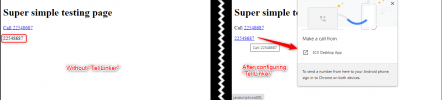
There are quite a few plugins out there doing this, converting numbers on pages to "tel" links. A random one I found for Chrome was called "Tel Linker" that allows you to enter a regex of what number formats to find and convert:
1628841660677.png

We are though considering making a plugin specifically for this.


The other things you mentioned are for discussion.
 
I tried setting :tel on two computers yesterday and it didn't work at a clients. I now have it working on my desktop at the office. I'll look into this Tel Linker for chrome. The client was using chrome so most of what I was doing was with that. Seemed odd it didn't work just launching it with the client but I'll try this.
 
  • Like
Reactions: NickD_3CX
@NickD_3CX It worked for me as well.
Thanks for your support
 
  • Like
Reactions: NickD_3CX
Just an update here guys, I just want to clarify that we will be releasing a plugin for Google Chrome that will handle click2call.

Our thought is to update the existing one, so everyone that currently has it installed, will automatically get the new version.
 
  • Like
Reactions: Evolute IT
Personally I think Contacts is more useful than the team tab. Chat with team and calling to team or members in all in the chat area now

In my case Team is more often used then Contacts in fact.
But i think there is plenty space there to keep actually both on left side...

Re Desktop chat

1) I dont like this behaviour when Im pasting image from clipboard it is being automatically sent.
As in other IM's - Img preview should be 1st presented for approval, then user should press 'send' button
(I sent few times something I didnt want to but was keeping in my cllipboard)
2) would be good to have message deletion option (see pnt above :) )
 
  • Like
Reactions: SyncWave
Gooday

A problem we found on the 3cx Desktop App v18.3.33 with Jabra Headsets and jabra direct loaded and setup properly:

If the dialer is not your focused windows ie. you have not clicked on the dialer window at the time of receiving a incoming call, you cannot use the call pickup button on the headset to pickup a call.
 
Gooday

A problem we found on the 3cx Desktop App v18.3.33 with Jabra Headsets and jabra direct loaded and setup properly:

If the dialer is not your focused windows ie. you have not clicked on the dialer window at the time of receiving a incoming call, you cannot use the call pickup button on the headset to pickup a call.
I can't seem to replicate this with a Jabra Engage I have handy.
What Jabra headset are you using?
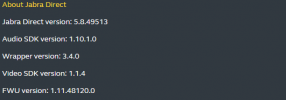
Also, is Jabra Direct on the latest version (5.8.49513)?
One more thing, are you running any other apps that may also have integration, like Teams, some other softclient, etc? If yes, close them all down, also exit Jabra Direct and Desktop app, then only re-launch Jabra Direct and the Desktop app.

I also sent you a PM with something to try.
 
Gooday @NickD_3CX

We currently have Jabra Direct 5.6.43171 installed, but i do see this morning there is an update available. I'll install the update and report back.

We are using the Jabra Evolve 65 Duo
 
Gooday @NickD_3CX

Currenty installed your new version as supplied, and new version of jabra direct. No other softclients/teams loaded.
1631868931256.png

Will provide some feedback shortly
 
  • Like
Reactions: NickD_3CX
Status
Not open for further replies.

Forum statistics

Threads
111,981
Messages
590,115
Members
164,908
Latest member
FarizQasimov